Design and Build Quality
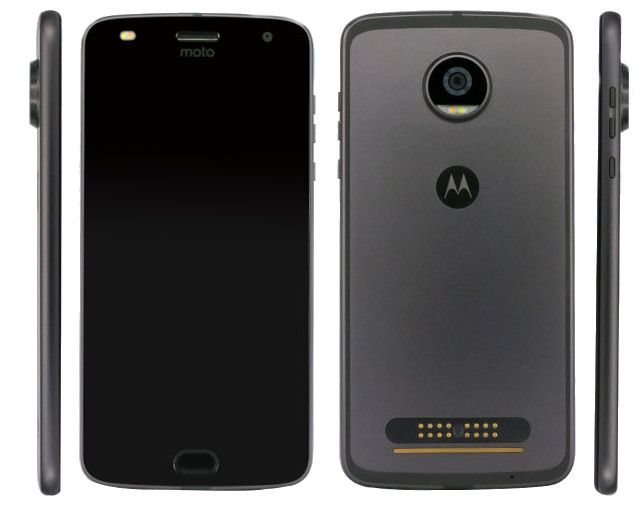
The Moto Z2 Play kind of keeps the Moto Z series design language, with that sleek, mostly minimalist vibe. It has a metal unibody, so it feels premium and tough at the same time. Overall the build quality is really solid ,you get a smooth finish and those edges are nicely made, which gives the phone a more sophisticated look. On the back you’ll find the camera module plus those magnetic connectors for Moto Mods, then in front there’s a big display with minimal bezels, like they didn’t want to distract you.
One of the more noticeable things about the Moto Z2 Play is how slim it is. It’s only 5.99mm thick, so it sits among the thinnest smartphones out there, and yeah it’s easy to hold, and easier to carry around. But, the slimmer body kind of comes with a tradeoff. The battery capacity is reduced versus the Moto Z Play, which was thicker and had a larger battery tucked inside. Still, even with that change, the phone feels comfortable in your hand and for everyday use.
The Moto Z2 Play shows up in a few colors, like Fine Gold , Lunar Gray and Nimbus Blue. Those options look stylish, and they give users some space to pair the device with their own personal vibe . Still, the glossy finish is kinda attractive but it can also become a fingerprint magnet, so you might find yourself cleaning it more often than you really want, especially after you’ve been touching it a lot.
Another thing people might notice is what’s missing , it has no IP rating for water and dust resistance. This isn’t rare for mid-range phones, but a lot of users now expect at least some kind of protection, particularly if you’re looking at the more high-end part of the market. Also, there’s no 3.5mm headphone jack, so for audio you’ll be using USB-C headphones or going wireless with a Bluetooth setup. That lack could be annoying if you prefer the simple plug in, wired headphones experience.
Display
The Moto Z2 Play comes with a 5.5-inch Super AMOLED display, and it’s set at a resolution of 1080 x 1920 pixels. That works out to a pixel density around 401 PPI, so basically text , pictures, and videos end up looking crisp and easy on the eyes. With Super AMOLED technology you get lively hues, deep blacks, and strong contrast, so the panel feels pretty capable for media watching, gaming, and day to day use.
It’s also bright enough for everyday outdoor use, though in direct sunlight you might still want to crank the brightness for the best readibility , especially when the light is really intense. The color reproduction stays faithful, and the screen maintains wide viewing angles, meaning the picture doesn’t get weird or washed out as much when you view it from the side.
On top of the usual color and contrast wins, the display has good touch sensitivity too. Taps and swipes are registered fast, which helps everything feel fluid and pleasant. Plus the bezels are kept fairly thin, so you get more screen space, and the whole front looks more modern.
One area where the display could be improved is in terms of resolution , While 1080p is perfectly adequate for most users, some people might still feel it is a bit underwhelming compared to the higher-resolution screens you see on more premium devices. Yet, since the Moto Z2 Play sits in the mid-range segment , the display resolution feels like a sensible compromise if we consider the overall value of the phone.
Moto Z2 Play basically keeps the vibe of its predecessor but adds a few slight tweaks. Most clearly, the device uses solid metal instead of the two glass backplates from the earlier model, though it’s not a huge shakeup. That switch makes the Z2 Play appear sturdier, with a more rigid sort of finish. The metal backing also resists fingerprints better than glass when it’s in your hands and being used. At the same time, the phone is thinner, measuring 5.99mm compared to 6.99mm before. It feels like a nice balance between an easy, comfortable grip and not sacrificing battery comfort. Still, it’s thicker than the Moto Z overall (5.2 mm), but it keeps the 3.5mm jack so it stays convenient for wired headphones. On the front, the Z2 Play comes with a 5.5-inch AMOLED panel , plus Full HD resolution.
The top of the Z2 Play screen includes a 5MP front camera, a 2-tone LED flash with speaker and sensor. Below is a physical key that integrates a fingerprint sensor and microphone (a small hole on the left). The Home button on the Z2 Play is rounder than the square one on the previous Moto Z Play. The back of the Z2 Play features two of the most prominent and important areas of the machine: a 12/9-point f / 1.7 camera with laser focus and a bottom magnetic contact cluster for connection to the Moto Mods. The inside configuration of the Moto Z2 Play has a Qualcomm Snapdragon 626 processor, with around 10 percent better output than the Snapdragon 625 used on older models, also 4GB of RAM and 64GB of internal storage. In practice the Z2 Play can take both sim cards and memory cards in the same slot, simultaneously, without any fuss.
Motorola Moto Z2 Play XT1710-06 – 64GB Dual SIM Factory Unlocked (Dark Gray) – International Version (No Warranty): Buy it now
The Z2 Play is equipped with a 3.000mAh battery that supports Turbo Charge technology for up to 7 hours of charging time after 15 minutes of charging. Another respectable point of configuration when Moto Z2 Play is installed with the latest Android operating system 7.1.1 and will be constantly updated with new versions from Google. Moto Z2 Play is currently priced at nearly $500.
Moto Z2 Play with accessories: manual book, sim card, USB Type-C to 3.5mm adapter, 3-pin charger, charger cable and headset.
Above the screen is a 5MP front camera cluster, a 2-tone LED flashlight, and a speakerphone. The Z2 Play screen supports the Always On Display display.
The front camera is equipped with a 2-tone LED flash that supports selfie and voice video in better low-light conditions.
Home key of the machine is integrated fingerprint sensor. The built-in Home button supports quick navigation, which frees up the area of the virtual navigation buttons on the screen, giving the user a more complete experience. To enable this setting, go to Moto -> Moto Action -> Navigate with a button.
The back of the Z2 Play is a piece of metal with an array of rim running around.
Close up of 12MP camera cluster with dual LED flash. The rear camera incorporates a laser-focusing technology that records objects at distances up to 3 meters and 5 times faster than normal in low light conditions.
Performance
Under the hood, the Moto Z2 Play is powered by the Qualcomm Snapdragon 626 processor ,which is a mid range chipset kinda aiming for that sweet spot between usefulness and efficiency. The Snapdragon 626 is an octa core setup with a top clock speed around 2.2 GHz, and it comes paired with 3GB of RAM plus either 32GB or 64GB of internal storage ,depending on which version you get.
Day to day, the Moto Z2 Play deals with web browsing, social feeds, and email without much fuss. Apps tend to pop up fast, and the whole thing feels steady during normal use . Multitasking is usually fine too, though heavy users could spot a bit of lag when multiple resource hungry apps are running at the same time.
When it comes to games, the performance is decent by mid range terms. The Snapdragon 626 can run games like PUBG Mobile and Asphalt 9: Legends , but you might want to tweak the visuals a little to keep things smooth. Sure, it isn’t really built for high end gaming, however for casual gaming it still delivers a pretty satisfactory ride.
Moto Z2 Play has one of those key attractions that come from Moto Mods , you know, the modular bits that sort of snap onto the back of the phone via magnetic connectors. A Mod can bring extra battery life, better sound, or even something like a projector, depending on what you pick. What I like is that the performance doesn’t seem to wobble when you attach these things, so day to day use stays steady, and the whole modular vibe adds this kind of adaptability that feels pretty specific to the Moto Z line.
In general the Moto Z2 Play still feels solid as a mid range device , even if it cant quite match the raw muscle you get from some of the more expensive high end phones. If someone is trying to land a fair compromise between performance and cost then the Moto Z2 Play tends to deliver a dependable , well rounded experience.
Software and User Interface
The Moto Z2 Play comes with Android 7.1.1 Nougat right away, plus Motorola’s light touch of customization on top. The software overall is clean and close to stock Android, so the interface is smooth, and it doesn’t drown you in pointless bloatware. Motorola usually sticks to near stock Android with a few helpful extras here and there, and this model keeps that same mindset.
A standout part is Moto Actions, which are gesture based controls you can use to do things quicker without many extra taps. Like you can open the camera by twisting your wrist, or turn on the flashlight by chopping down twice. These gestures feel practical in real life, and they make the phone more convenient in day-to-day moments , rather than just being a gimmick.
Moto Display is another useful feature, it lets users peek at notifications and also interact with their phone without having to fully unlock it. Basically the screen shows a little preview of what came in, and then you can answer fast or just dismiss it without going through the whole unlock routine. In practice this is especially helpful when you’re trying to manage alerts without really breaking whatever you were doing, yeah that continuous focus.
The Moto Z2 Play also brings a bunch of customization options, so people can nudge the vibe of the interface to match their taste. Themes, icon packs, and wallpapers can all be switched around, which means your device can feel more tailored, not just “the default”.
One small downside in the software side is that the Moto Z2 Play has not gotten updates to newer Android versions as promptly as some other phones. It did eventually reach an update to Android 8.0 Oreo , but it wasn’t exactly a first wave kind of device. So if someone really cares about the newest features plus the latest security patches, this timing might feel like a real concern.






Tech Reviewer & Product Analyst
Định Bia has spent over 10 years testing consumer electronics with a focus on smart technology. He work as a product advisor at Biareview where he helped customers find the right devices for their needs. He personally tests every product featured on this site using a consistent evaluation framework covering quality, durability, and value. All reviews are based on experience, not influenced by the manufacturer.