Design and Build Quality
Unconventional Form Factor
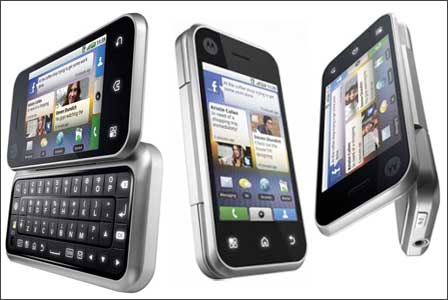
The Motorola Backflip was pretty much unlike any other smartphone on the market, back then. What really stood out was the “backflip” arrangement—so you had this hinged QWERTY keyboard that sort of folded back against the rear of the device when it wasn’t needed. When it’s closed the keyboard is facing outward, so the keys are right there. People definitely raised eyebrows about it, but at the same time it helped the phone fit a larger screen than you might expect, because the keyboard didn’t have to slide out from under the display.
Build Quality and Materials
In general the Backflip felt solid in the hand. It used a mix of metal plus high grade plastic, which gave it this sturdy, dependable kind of feel. The hinge itself seemed built to last, and the movement between closed and open was pretty smooth. Still, there was that one obvious compromise, the keyboard sitting on the outside. That part could be a durability weak spot, since it’s more exposed to scuffs, scratches, and general wear as time goes on. Even so, Motorola didn’t just throw it together… the keyboard was put together well, and the keys had a tactile response, they felt responsive, not mushy or vague.
Keyboard and Touchpad
One of the more eye catching ideas on the Backflip was that touchpad on the back, positioned just above the keyboard. It let you move around the interface without covering the display with your fingers, kinda like a laptop style trackpad. It was definitely unusual, and it sounded great on paper, but whether it was actually practical was another story. Some folks said it worked really well, especially for scrolling through long lists or webpages. Other people, however, thought it was more like an extra complication than a true advantage.
The QWERTY keyboard itself was sort of the standout thing. it gave a comfortable typing experience with keys that were nicely spaced, and they had decent travel. The way the keyboard was built really made sense for heavy texters, or for people who just liked physical keyboards more than those virtual ones. still, that exposed keyboard could be a little risky, because accidental key presses happened if the phone was in your pocket, or in a bag, you know
Size and Ergonomics
The Motorola Backflip came in at 108 x 53 x 15.3 mm and it weighed 133 grams. Those measurements made it a bit bulkier than many of its contemporaries , especially when you compare it to phones that were basically touchscreen-only. the extra thickness was pretty noticeable, but it was kind of the cost of having that physical keyboard. Even with the bigger footprint the Backflip stayed comfortable to grip, and the hinge setup let it shift into different ways of using it, like a tent-style mode for watching videos
Display
Screen Specifications
The Motorola Backflip had a 3.1-inch TFT capacitive touchscreen, and it ran at 320 x 480 pixels. that worked out to around 186 PPI. honestly the resolution was fine for that time, but it wasn’t especially sharp, particularly compared to devices that were starting to show WVGA screens (480 x 800)
Display Quality
The Backflip’s display quality was kinda decent, you know, good color reproduction and brightness levels overall. But yeah, the screen is small and the resolution is lower so text and images didn’t look quite as sharp as you’d see on a few competing devices. Also the viewing angles felt limited which is pretty common for TFT screens. Touch response was quick, and the capacitive panel kept things smooth, though the whole feel wasn’t as immersive as on bigger higher-resolution displays.
Outdoor Visibility
Outdoor performance was fine…just not really standout. You can bump the brightness up enough for direct sunlight use, but glare and reflections still showed up. And since the screen is relatively small, it’s just harder to use the phone outside, because on-screen items look smaller and harder to tell apart at a glance.
Performance
Hardware Specifications
The Motorola Backflip was driven by a 528 MHz Qualcomm MSM7201A processor, with 256 MB of RAM and 512 MB of internal storage. In 2010 standards that sounded modest already, since a lot of smartphones were starting to come with quicker chipsets and more memory. The hardware handled everyday stuff and moderate multitasking okay, but once you go into heavier applications and games, it kinda struggled a bit, like it wasn’t built for that.
General Performance
In day to day use, the Motorola Backflip did what you’d expect, more or less, for the usual stuff like texting, calling, and basic web browsing. The user interface, driven by Motorola’s MOTOBLUR overlay on top of Android 1.5 Cupcake (with a possible later upgrade to Android 2.1 Eclair), felt mostly fluid, yet there were those random hiccups and small stutters, especially when you bounced between apps or tried to keep multiple things going at the same time.
The 256 MB of RAM, kind of, becomes a bottleneck pretty fast. It limited multitasking in practice, not just on paper. More than once apps would either shut down, or they’d reload when you switched back to them, which made everything feel less seamless. On top of that, the 528 MHz processor was starting to age, because newer handsets with quicker chipsets deliver noticeably snappier reactions.
Gaming and Multimedia
This phone was not really built with gaming as a priority, and the internals sort of tell you that right away. Sure it can manage casual games like Angry Birds, and some simple puzzle titles, but anything more graphically heavy was usually out of reach. The combination of lower processing horsepower plus tight RAM meant that demanding games struggled to stay smooth, or even to stay stable for longer sessions.
For media consumption, the Backflip was sort of ok but not really outstanding. The screen is smaller, and the resolution also kinda lower, so watching videos was less pleasant, especially compared with bigger devices. It could handle standard-definition videos with no big drama, yet high-definition content turned into more of a hassle. The speaker sounded decent, giving clear audio at medium levels, but it had little bass, and when you crank up the volume it can get kinda tinny.
Software and User Interface
Android Operating System
The Motorola Backflip shipped initially with Android 1.5 Cupcake, an earlier release of Android. Later it could be upgraded to Android 2.1 Eclair, and yeah that brought improvements, like smoother behavior, extra functions, plus a refreshed-looking user experience. Still, the Backflip stopped there, it didn’t get updates beyond Android 2.1. So while newer Android versions kept arriving, the phone sort of stayed behind, kinda left out.
MOTOBLUR Interface
Motorola’s MOTOBLUR was basically a custom layer, a skin that tried to add a bunch of different extras on top of Android. MOTOBLUR blended social media updates with messages and emails into one single place, which made it easier to remain in touch across multiple services, and not just one app at a time. It also had custom home screens with widgets, so you could reach commonly used apps and info fast without too much searching.
While MOTOBLUR had its advantages, it was not without drawbacks, I mean you could feel it in day to day use. The extra features and visual bits that MOTOBLUR brought in could make the phone feel a bit slower, especially on hardware as modest as the Backflip’s. Also, a few users said the interface was a bit too layered or even less intuitive than stock Android, like it did not just “click” for them. Sure, the way it pushed social media updates straight onto the home screen was kinda novel, but for people who liked a cleaner, more minimalist look, it could get overwhelming fast .
Customization options
The Motorola Backflip offered a decent amount of personalization, so users could tweak their home screens with widgets, shortcuts, and wallpapers. The MOTOBLUR interface also let users resize widgets and shuffle icons around to fit what they wanted. Still, the customization toolkit was not as broad as what came later on newer Android versions, and on top of that the phone’s hardware limits kept things in check, you know what I mean .
App ecosystem
The Backflip could tap into the Android Market, which is now the Google Play Store, and it had a growing stream of apps and games. However, because the device ran on limited hardware plus an older Android build, not every app worked properly or even at all. That, in turn, narrowed the Backflip’s audience for folks who wanted the newest releases, the latest and greatest stuff right away.
Camera
Camera specs sorta, the Motorola Backflip had a 5-megapixel back-facing camera, with autofocus and an LED flash. Back then, a 5-megapixel camera was pretty much the norm for midrange phones, so having autofocus plus that little flash was… honestly a solid extra.
Image quality
In brighter lighting, the Backflip camera made decent photos, with good color reproduction and enough fineness in the details. but when it was dim, the whole thing fell off. pictures often looked grainy, and they didn’t really hold onto detail. The LED flash did help during low light moments, still it wasn’t that strong, so the outcomes were usually a bit disappointing.
The camera app layout felt easy enough, with simple options for exposure tweaks, white balance changes, and basic scene modes. Autofocus was usually correct, though sometimes it was slow, then you’d end up missing the moment. it also didn’t offer more advanced tools, like optical image stabilization or real manual controls, which made it less flexible overall.
Video recording
For video, the Backflip could record at 352 x 288, and yeah that’s under the VGA standard 640 x 480 that a lot of smartphones had around that time. The quality was okay for casual clips, but it wasn’t great if you wanted high quality footage. Videos shot on the Backflip often looked pixelated, not very crisp, and especially in darker settings they just didn’t look sharp enough.
Battery Life
Battery Specifications
The Motorola Backflip came with a 1400 mAh removable battery, pretty much what you would expect from phones around that time and size. Because it was removable, people could stash a spare battery or swap the battery if it started to fade, you know as it aged.
Battery Performance
In day to day use, the Backflip’s battery was kind of average. The 1400 mAh cell did manage to power the phone through a full day of moderate usage. Still, that depended on the way the phone got used. With light use like a bit of texting, calling, , and normal browsing, the battery usually made it to the end of the day. But if you got into heavier stuff, like watching videos, using GPS, or playing games, the battery would drain faster, and a lot of the time it meant plugging in again mid-afternoon.
Also the battery performance was not just the battery. The MOTOBLUR interface was a factor too, it kept syncing social updates, emails, and other data in the background all the while. That was convenient, but it also added extra load. If you wanted to stretch battery life you could turn off or lower the frequency of those background syncs, though, that meant giving up the more immediate updates that MOTOBLUR was built to deliver.
Charging and Battery Management
The Motorola Backflip charged with a standard micro-USB port. The charger in the box could bring the battery back up in roughly 2 to 3 hours. It didn’t support fast charging , which was still uncommon then so you had to charge at the right times.
One upside of the Backflip’s design was, kinda the removable battery thing , which let users stash a spare battery for longer sessions without needing to hunt down a charger every time. That was especially handy for travelers and anyone who’s always moving around. Still, like with all batteries, the Backflip battery life would slowly fade as time went on, and heavy users might end up needing a swap after a year or two.
Connectivity and Call Quality
Network Support
The Motorola Backflip ended up being a quad-band GSM phone, so it worked on both 2G and 3G, plus HSDPA speeds that could reach up to 7.2 Mbps. In practice, this meant it would be a good fit for most carriers worldwide, even if it was mainly pushed in North America. Network performance was pretty normal for the period , delivering steady voice calling and decent data results for browsing and app use over 3G.
Wi-Fi and Bluetooth
The Backflip also had Wi-Fi 802.11 b/g, so users could jump onto local wireless networks for quicker internet access and for data-heavy tasks without constantly leaning on cellular service. Wi-Fi behavior was usually solid too, with stable linking and speeds that felt fair for surfing , streaming, and pulling down apps.
Bluetooth 2.0 with A2DP was also on board, so basically wireless connections to Bluetooth headsets , speakers, and other add-on accessories were possible. The whole Bluetooth experience was good enough, with a solid range and connections that stayed steady, but yeah it didn’t bring the newer, fancier tricks or the faster data carrying speeds you get from later Bluetooth versions.
GPS and Navigation
The Backflip came with A-GPS, which gave location services for maps, navigation and those location based apps. The GPS itself seemed accurate, and outdoors it could grab a satellite lock pretty quickly. Motorola also used Google Maps as the default navigating app , it handled turn-by-turn directions and local searches in a pretty reliable way. Still, the tiny screen and lower resolution kinda make the Backflip less friendly for navigation compared to bigger phones, it’s a bit fiddly.
Call Quality
Call quality on the Motorola Backflip felt solid , with clear audio on both sides of the call. The earpiece offered a decent volume and the noise-canceling microphone did its job by trimming background noise during conversations. But speakerphone performance was just average, and at higher volumes there was some distortion. Also, the speaker sits on the back of the device right next to the keyboard, so when the phone is set flat, the sound can get muffled , which isn’t ideal.
User Experience and Usability
Everyday Use
In day-to-day use, the Motorola Backflip gave a bit of a split sort of feeling. Its odd, more physical design, and the actual keyboard helped it connect with people who like tactile typing, and the touchpad sitting on the back of the screen gave a rather different way to move around. But then the hardware limits kicked in, plus the older Android version, so the whole thing felt slow-ish and kind of behind, especially once faster, newer smartphones started showing up everywhere.
Also, the Backflip’s smaller screen affected how usable it felt. Yes, the compact shape is nice for carrying, but the display area was pretty tight , and when you tried navigating bigger apps, or just enjoying multimedia, it could feel cramped. And that visible keyboard on the back of the device… it was a kind of double-edged situation. It was quick for grabbing messages or typing on the spot, however it also made the phone seem wider in the hand, and it seemed easier to hit keys by accident while you were just holding it.
Target Audience
The Motorola Backflip was pretty clearly meant for people who really like physical keyboards, and who were also deep in social media habits. The MOTOBLUR interface was built to keep that social routine smoother, by combining updates from several platforms right on the home screen. That setup made it especially attractive to younger users, those who stayed active on Facebook, Twitter, and similar networks.
Still, the phone’s appeal was kind of, limited due to modest hardware and some aging software. As the Android world kept moving on, the Backflip being unable to upgrade past Android 2.1 Eclair kind of left it behind when it came to app compatibility and day to day overall functionality. Basically this made the device less compelling for tech savvy people, who really wanted the newest functions and apps.
Conclusion
Strengths
Innovative Design: The Motorola Backflip had a sort of standout backflip mechanism plus a touchpad, that separated it from other smartphones around that period, giving it a different form factor that suited users who cared about having a physical keyboard.
Good Build Quality: Even with its unusual design, the Backflip was built well , using sturdy materials and a strong hinge system that helped it stay durable over time.
Solid Keyboard: The full QWERTY keyboard delivered a comfortable typing experience, which worked well for folks who favored real keys rather than on screen ones.
Social Media Integration: Motorola’s MOTOBLUR interface brought fairly strong social features, with live updates from multiple platforms right on the home screen.
Weaknesses
Outdated gear: the Backflip’s 528 MHz processor, and 256 MB of RAM really sounded underpowered even around 2010 ,so everything felt a bit slow, and multitasking was pretty limited.
Not great software: it stayed stuck on Android 2.1 Eclair, which meant it missed a lot of the upgrades and new functions that showed up later, so in the long run it just didn’t stay as appealing.
Tiny screen: that 3.1-inch display was small compared to many other phones, so for movies ,music, and even casual web browsing it was kinda less than ideal.
Keyboard on the outside: sure, the exposed keyboard concept was clever, but it was also more likely to get worn down, or trigger accidental key presses, and honestly it made the whole device feel a little bulky.
Final Verdict
The Motorola Backflip was this bold, kinda inventive attempt to, well, stand out in a smartphone market that was already packed. I mean it really did try to be different, and the results were pretty clear in places, like the distinctive look, solid build feel, and that strong social media integration. So if you cared about having an actual physical keyboard and you were, you know, active on social networks, the Backflip felt like a real option. But then, in the end, the phone’s modest hardware, limited software support, and the small screen size sort of made it hard for the device to get broad, widespread success.
If someone’s top priority was a physical keyboard with a design that looked different, the Backflip offered a pretty persuasive alternative to the slate-style phones that were becoming more and more common. Still, for users who wanted the newest apps, smoother day to day performance, and a more modern user experience, the Backflip’s limits were not exactly easy to ignore. It kinda shows how one or two standout features can’t fully cancel out everything else.
Looking back, the Motorola Backflip is a kind of example of how innovation can separate a device from the crowd, and at the same time narrow its appeal. It probably wasn’t a total, full game-changer for the long run, yet the Backflip’s unusual way of handling smartphone design is still a solid, noteworthy chapter in the story of mobile devices.
Motorola Backflip MB300 Unlocked Cellphone: Buy it now
Motorola MB300 BACKFLIP GSM Quadband Phone (Unlocked): Buy it now

Tech Reviewer & Product Analyst
Định Bia has spent over 10 years testing consumer electronics with a focus on smart technology. He work as a product advisor at Biareview where he helped customers find the right devices for their needs. He personally tests every product featured on this site using a consistent evaluation framework covering quality, durability, and value. All reviews are based on experience, not influenced by the manufacturer.