Design and Build Quality
a. Premium Construction and Materials
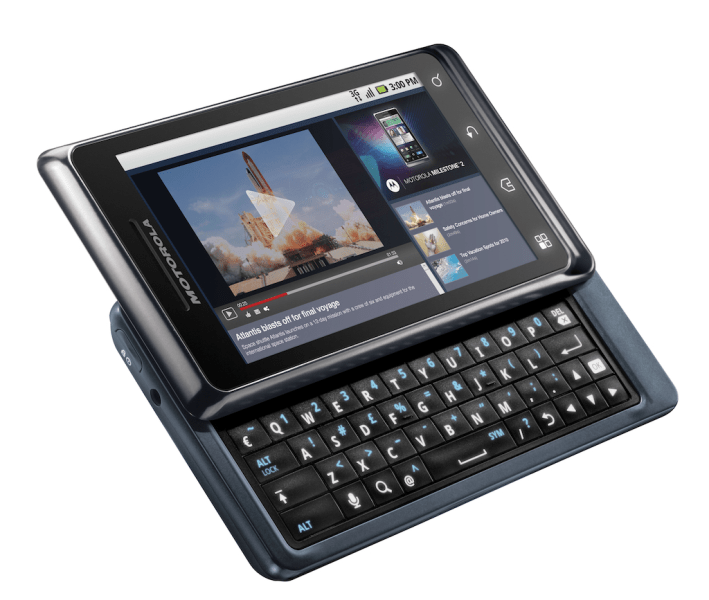
The Motorola Milestone 2 was, back then, one of those high-end models, it came out with a solid build and a neat, clean look. It kept the recognizable vibe of the previous version, but also added a few enhancements here and there. Basically you get a solid plastic body with a matte finish, which feels pretty durable, and in a way more premium than you’d expect.
On the front, the whole thing is mostly taken by a 3.7-inch TFT display with a resolution of 480 x 854 pixels. For its time, that was pretty standard, not amazing, but totally in line with other smartphones. Under the screen, there’s a full QWERTY keyboard that slides out , as in from underneath. This keyboard is one of the main attractions on the Milestone 2, it was made to give users a satisfying typing experience, especially if you prefer real physical keys rather than tapping on-screen.
In hand, the build quality feels robust, it has that steady, reassuring weight and overall sturdiness. The design stays practical and stylish, with tidy lines and a slim-ish profile that doesn’t look awkward.
b. Ergonomics and Day to Day Handling
The Motorola Milestone 2 measures 116 x 60 x 13.7 mm, and it weighs about 169 grams. Yes, it can feel a bit bulky, compared to today’s phones. But that was sort of the point, because it had to make room for the full QWERTY keyboard. Still, it feels reasonably comfortable to hold, and the weight distribution is pretty well balanced so your grip doesn’t get tired too fast.
When you slide the keyboard out, it moves smoothly , and you also get tactile feedback while typing. A lot of users really like that part. Overall, the ergonomics are tuned for usability, especially if you use your phone a fair amount for texting or emailing, like, all day long.
c. Display
The 3.7-inch TFT screen on the Motorola Milestone 2 comes with a resolution of 480 x 854 pixels, and honestly it was quite enough back then. Still, when you compare it to today’s high-resolution panels with cleaner color handling, it kind of feels behind. The TFT tech here gives solid color rendering and reasonable brightness, though it doesn’t look as lively as the AMOLED screens you see on newer smartphones.
It responds to touch well, but the touch sensitivity maybe doesn’t hit the same benchmark as more current devices. The surface is protected by Corning Gorilla Glass, so you get an extra guard layer against smudges, scratch marks, and small impacts
d. Design Aesthetics
The Motorola Milestone 2 keeps a tidy, useful design, more focused on practicality than show. The complete QWERTY keyboard is the main highlight and the fact that it slides out adds a certain distinctive feel. On the front, the display and keyboard take most of the attention, and on the back it stays pretty plain, with just the camera module plus the Motorola logo.
Overall the look of the Milestone 2 feels practical and also nice to the eye , it serves people who really want a physical keyboard alongside a touchscreen.
Performance and Hardware
a. Processor and Memory
The Motorola Milestone 2 runs on a 1 GHz ARM Cortex-A8 processor, and it s matched with the TI OMAP3630 chipset too. In practice this kind of processor could keep up with most tasks, pretty efficiently back when it was released. The handset also includes 512 MB of RAM , which helps keep switching between apps reasonably fluid and supports everyday performance.
For space, the Milestone 2 includes 8 GB of built in storage. It can be expanded using a microSD card slot, so users can stretch the available room. That add-on flexibility is pretty useful if someone needs extra space for media, apps, or other files.
b. Battery Life
The Motorola Milestone 2 comes with a 1400 mAh removable battery. For its era, that level of capacity was usually enough to get through a full day, assuming normal use. Since the battery is removable , a user can bring a spare around or swap it out when it starts to wear, which is a convenience that you do not see as often on newer phones.
Battery performance on the Milestone 2 is generally solid, but it can change based on how it s used, plus what settings are enabled. Power management features on the device work to stretch runtime, so the phone can keep doing more of its usual work across the day, without draining too quickly.
c. Performance and Usability
The Motorola Milestone 2 gives pretty good performance for its time, kind of solid, with that 1 GHz processor and 512 MB of RAM dealing with most daily tasks in a decent way. It runs Android 2.2 Froyo and honestly that was a capable operating system back then. Day to day use feels generally smooth , with touch input that responds quickly and multitasking that works well enough without constant delays.
The full QWERTY keyboard definitely improves usability, especially when you are texting, emailing , or writing little documents. The physical keys give a tactile sort of feedback and it feels easier to manage than the on screen keyboards. a lot of people, even today, prefer this kind of input.
All in all, the Milestone 2 stays dependable, with usable convenience that feels good for typical needs, but yeah, it probably can’t match modern smartphones in raw power or speed.
Camera and Multimedia
a. Camera Performance
The Motorola Milestone 2 includes a 5 MP rear camera , along with an LED flash. It can take photos at 2592 x 1944 pixels, so the resolution is there for a device from that era. In practice the camera results are fairly decent, with acceptable image sharpness, and color reproduction that looks reasonable.
Video recording is also supported at 720p which gives you high-definition capture for those daily clips and stuff like that. The camera software kinda brings the basics, like autofocus, digital zoom, and a set of shooting modes that cover the most common scenes.
There is also a front-facing VGA camera, which is intended for basic video calls and simple selfie moments. It won’t bring very high detail images, but it does what it needs to do for those light use cases.
b. Multimedia Capabilities
The Motorola Milestone 2 kind of supports a bunch of multimedia formats, like MP3, AAC, and WAV for audio, and also MP4, AVI, and WMV for video playback. The built in media player works with these pretty well, so you get a solid multimedia experience overall, even if it’s not the newest setup.
The 3.7 inch display, even though it’s not as modern as today’s screens, still gives you a decent view for videos and images. The audio quality is pretty good too, with clear sound coming from the built in speakers, plus you can use the standard 3.5 mm headphone jack.
c. Audio Quality
For audio, the Milestone 2 delivers a satisfactory level, with stereo speakers that sound clear and fairly loud. The speakers are placed in a way that helps, so the sound usually doesn’t get blocked by your hand or anything like that. On top of that, there’s also a 3.5 mm headphone jack, which makes it easier to connect headphones and it feels more immersive when you listen.
So overall, the audio performance matches what you’d expect from that era, giving good sound for both multimedia use and phone calls. It’s not mind blowing, but it is reliable enough.
Software and User Experience
a. Operating System
The Motorola Milestone 2 originally shipped with Android 2.2 Froyo, which was quite a big move compared to older versions. Android Froyo brought in a few meaningful additions, like faster speed overall, better app management, and stronger support for multimedia stuff.
The operating system feels smooth and kinda easy to use, you basically get direct access to the Android Market, later renamed to the Google Play Store, for downloading apps and games. Froyo also brings in useful options such as improved multitasking , Wi-Fi hotspot functionality, and a noticeably faster browser too.
b. User Interface
On Android 2.2 Froyo, the user interface is simple enough, and it’s not too hard to move around. The home screen comes with customizable widgets plus shortcuts, so people can tune up the look and the workflow. Also, the device physical keyboard works as another input route which can really help when you’re doing typing-heavy activities.
The Milestone 2 interface is responsive, with fluid transitions, and the animations look clean. When you pair the touchscreen with the physical keyboard, you get this practical flexibility in how users actually interact with the phone, depending on what they’re doing.
c. Performance and Usability
The Motorola Milestone 2 keeps things running pretty smooth with Android 2.2 Froyo, so it feels responsive, and overall pretty user friendly even if you move around apps quite a bit. The 1 GHz processor plus 512 MB of RAM manages most day to day tasks, and plenty of applications without major slowdowns.
Also, the physical keyboard helps usability a lot especially for people who want that tactile kind of feedback instead of relying fully on screen keys. The way the device handles input, and just generally how it responds contributes to a mostly good daily user experience.
Connectivity and Features
a. Connectivity Options
The Motorola Milestone 2 supports multiple ways to stay connected, like 3G, Wi-Fi, Bluetooth 2.1, and GPS. Having 3G means decent internet speeds, but Wi-Fi is there too, giving access to quicker networks for browsing, and also for downloads.
Bluetooth 2.1 makes it easier to pair wirelessly with different gadgets such as headphones, speakers , and similar things. GPS, on the other hand offers more dependable tracking for navigation, plus location based services.
b. Additional Features
The Milestone 2 comes with a few extra features that makes it feel more functional. For instance, there’s a removable battery, expandable storage through microSD , and support for a variety of multimedia formats. It also includes a standard 3.5mm headphone jack, so you can switch up audio accessories with less hassle, anytime you need it.
c. Durability and Protection
The Motorola Milestone 2 is kinda not really sold as a rugged phone or anything but, honestly its build quality and overall design still help with real-world durability. It has a plastic body and also Gorilla Glass on top, so you get solid resilience for scratches, plus those small minor bumps you get by accident. On top of that the battery is removable , so carrying a spare or just swapping it out becomes easier, especially when it starts acting up or just runs out too fast.
Pros and Cons
a. Pros
Good Performance for Its Time: With a 1 GHz processor and 512 MB of RAM, it manages to handle everyday stuff and typical applications pretty well, so for its era it feels like a capable device.
Removable Battery: Being able to swap it , or keep a spare on hand , adds a kind of convenience that nowadays is far less common in modern smartphones.
Decent Camera Quality: The 5 MP rear camera along with 720p video recording gives results that are satisfactory for the period, and it works fine for casual photography, as well as simple video capture.
Expandable Storage: The microSD slot lets users extend storage space, which is handy if someone has a lot of media , like photos and downloads.
b. cons
Outdated hardware : the 1 GHz processor and 512 MB RAM, are kinda outdated compared to modern smartphones, which usually come with faster processing muscle and more RAM, it’s not really a fair match.
Limited internal storage : with just 8 GB of internal space, the device might be a pain for people who keep a lot of apps and media, even if the microSD card slot helps a bit with that, you still may feel constrained.
Old operating system : it runs Android 2.2 Froyo, so it misses many newer features and security fixes that newer Android versions include, and that can influence how well it plays with more recent apps.
Bulky design : the physical keyboard and the overall build make it feel more bulky, which might be less convenient than the sleeker handsets people use today
Limited screen resolution : the 3.7-inch display at 480 x 854, looks behind today’s screens, with higher resolutions and improved color accuracy.
Conclusion
The Motorola Milestone 2 kinda sits as a big deal in the early days of Android smartphones. It had that full QWERTY keyboard, solid overall speed, and a pretty premium build ,so it pulled in people who really like tactile typing and also wanted something that felt sturdy in the hand. Even if the Milestone 2’s hardware and software feel dated compared to today’s phones, it still counts as an important chapter in Motorola’s smartphone story.
If someone is hunting for a phone with a physical keyboard , expandable storage, and a durable body, the Motorola Milestone 2 gives this nostalgic look back at mobile tech. You can also see its influence on Motorola’s strategy and how it helped, in a meaningful way, the Android ecosystem grow, which is why it matters in the broader path of modern smartphones.
So yeah, in conclusion the Motorola Milestone 2 might not really go up against today’s high-end devices, but it stays a worthwhile piece of technology history. For collectors and enthusiasts it offers a distinctive perspective on how smartphones developed, and it also reminds you that mobile technology is always shifting, changing.
Motorola Milestone 2 Unlocked Cell Phone with 5 MP Camera, WiFi, and GPS–International Version with Warranty (Black): Buy it now
Related Posts

Tech Reviewer & Product Analyst
Định Bia has spent over 10 years testing consumer electronics with a focus on smart technology. He work as a product advisor at Biareview where he helped customers find the right devices for their needs. He personally tests every product featured on this site using a consistent evaluation framework covering quality, durability, and value. All reviews are based on experience, not influenced by the manufacturer.