Design and Build Quality
a. Aesthetic Appeal
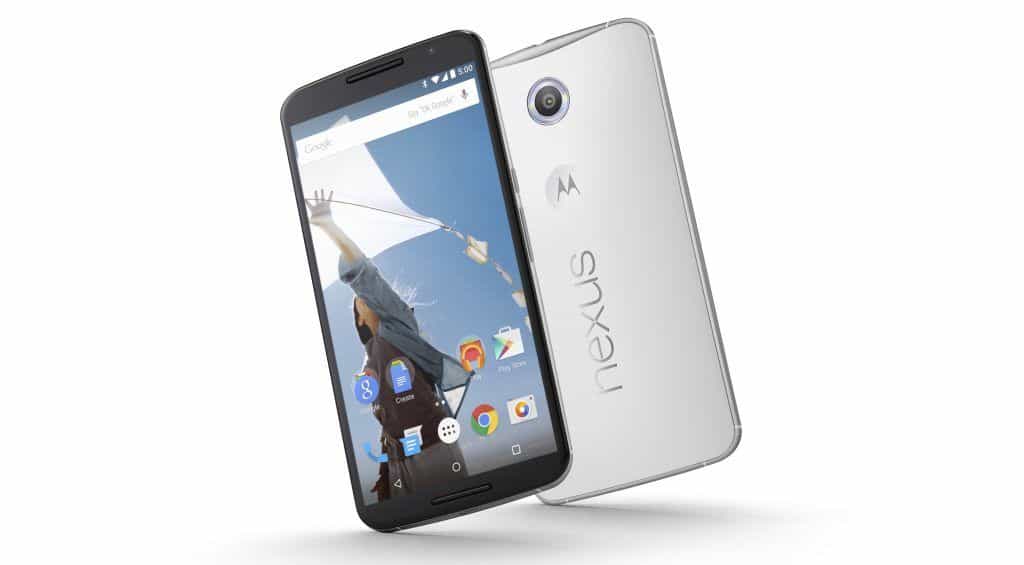
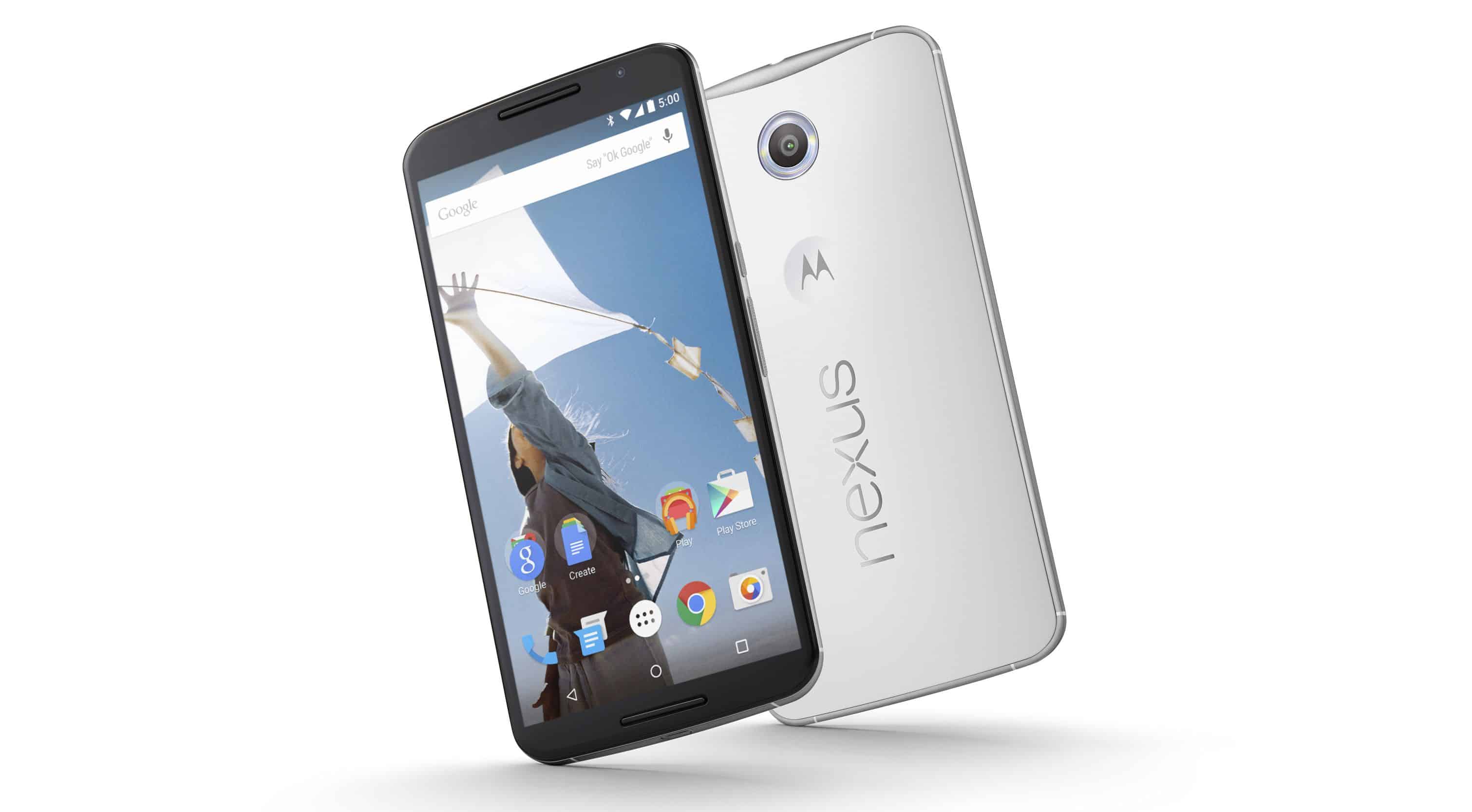
The Nexus 6 sort of shows off a modern, more sophisticated design, and it felt pretty distinctive when it came out. You get this large 5.96-inch display, so it was one of the chunkier phones back then. The look and feel is mostly rounded edges, plus an aluminum frame, which gives it that kind of premium impression, without really trying too hard.
It comes in two color options, Midnight Blue and Cloud White. The Midnight Blue model leans into a deep, dark vibe, a bit of elegance, and the Cloud White option looks brighter, more contemporary, if you know what I mean. The design is kept pretty clean and minimalist, and the Nexus logo is shown pretty clearly on the back, in a way that doesn’t feel hidden.
b. Build Quality
The Nexus 6 build quality is honestly strong for its category. It has a sturdy aluminum frame with a matte finish that helps for grip and also holds up better in daily use. On the back there’s a soft touch plastic cover, that feels comfortable in the hand, and honestly it does a decent work at resisting fingerprints, also the smudges too. Overall it just feels solid, like it’s actually well assembled rather than kinda flimsy.
Also the back is slightly curved, so even with all that size it’s a little more manageable to hold and use. The aluminum frame brings in the rigidity, while the plastic back gives you that softer comfort, so you get a pretty balanced mix of durability and ease.
c. Ergonomics
Since it has such a big size, the Nexus 6 is honestly not the smoothest device to juggle with one hand. Still, the design uses rounded edges and a pretty steady grip, which helps a lot even if you don’t really notice at first. Most people will probably find the button and port layout fairly ergonomic, but if your hands are smaller, one-handed use can feel a bit annoying, or even tiring after a while.
The power button plus the volume rocker are placed on the right side, so it’s easier to reach without doing those awkward wrist shifts, that sort of thing. And having the 3.5 mm headphone jack sitting at the top, while the micro-USB port is at the bottom, works out well for most users too, because the interactions feel natural.
d. Durability
There’s no official IP rating for water or dust on the Nexus 6, so its durability is kind of limited compared with some tougher rivals. But the build quality itself is fairly sturdy, and the phone looks made for ordinary day-to-day bumps, scratches and wear. That said, users may want to use a protective case just to be safe, mainly because it’s larger and the display can be a little more exposed than you’d expect.
Display
a. Screen Specifications
The Nexus 6 sports a 5.96 inch AMOLED panel, with a resolution of 1440 x 2560 pixels. That configuration gives a pixel density around 493 PPI, roughly speaking. The overall goal of the large screen, paired with that higher resolution, was to deliver a vivid, almost immersive kind of viewing experience, where colors and detail feel more alive.
b. Display Quality
The Nexus 6 display quality is one of those features that really pops. The AMOLED panel gives strong color reproduction, really dark blacks, and solid high contrast, so the visuals look bright, a bit eye catching, and kinda alive. With the high resolution you get crisp text, and more detail in images too , which is why it feels great for streaming media, playing games, and doing the usual day to day stuff.
Also , the AMOLED tech kinda helps with power efficiency in a real way. Since each individual pixel can be turned off, it can get you actual blacks , and that can also cut down energy use. When you add the huge screen size to that, the Nexus 6 feels like a pretty decent choice for people who care about how the display looks in the first place.
c. Brightness and Outdoor Visibility
In different lighting situations, the Nexus 6 screen stays pretty calm. It’s bright enough for comfortable use even while you’re outside in direct sunlight, though glare can still pop up in super bright areas , so it’s not exactly magic. The AMOLED panel, with its deep blacks and strong contrast, helps keep things readable when the conditions get messy.
d. Touch Sensitivity
Touch sensitivity on the Nexus 6 comes across as responsive and also fairly precise. It supports multi-touch gestures, and the whole interaction feels smooth with both the operating system and apps. The touchscreen handles daily stuff well , like typing, swiping, and moving around the user interface, without that “laggy” feeling that can ruin the vibe.
Performance
a. Processor and RAM
The Nexus 6 runs on a Qualcomm Snapdragon 805 chipset, with a quad-core Krait 450 processor that can reach 2.7 GHz. It also comes with 3 GB RAM. The Snapdragon 805 was pretty much one of the higher-tier processors back then , so you really feel the difference in speed compared with older generations.
b. Benchmark Performance
When it comes to benchmark tests, the Nexus 6 shows solid results , you can see that in the numbers that line up with the hardware quality. With the Snapdragon 805 together with 3 GB of RAM, the phone handles heavy apps and multitasking in a pretty steady way. day-to-day performance feels smooth, responsive , and there is usually little to no lag, or that small stutter people sometimes notice.
c. Gaming Performance
For gaming, the Nexus 6 does really well, largely because it has both capable hardware and a high-resolution screen. The device manages graphically demanding games even on higher settings, and the frame rates stay fairly smooth while the visuals look crisp. You can also access a big variety of games, and most of the time you won’t run into major performance snags , so it tends to work nicely for mobile gaming fans.
d. Multitasking
The Nexus 6 has 3 GB of RAM , and that helps it do multitasking pretty well, like users can jump between apps and keep a few applications working at the same time without it feeling too sluggish. In real use multitasking, the overall response seems solid , with smooth switching and just minimal lag. Plus the Snapdragon 805 chipset gives it the muscle to juggle different needs, from productivity tools, to multimedia playback stuff and similar tasks.
Camera
a. Rear Camera Specs
For the back side , the Nexus 6 comes with a 13-megapixel camera, f/2.0 aperture, plus optical image stabilization (OIS). It also has a dual-LED flash , meant to help when lighting gets dim. The 13-megapixel sensor is built for higher resolution shots, so you get decent detail and that “clear” kind of look.
b. Camera Performance
In general the camera performance is quite reliable, it tends to produce good photos across different light situations. The OIS is a big help, it cuts down on blur that comes from shaky hands , so images look sharper and more defined. The dual-LED flash offers enough light for low-light photography, but when the conditions are tough, like very dark scenes, there can be some noticeable noise.
Also the camera app isn’t barebones, it includes multiple features and modes, such as HDR, panorama, and a manual mode for extra control. Those options let people tinker a bit and try different photography approaches, which usually improves the final outcome. Overall, the Nexus 6 camera feels satisfying for casual shooting , and it works well for everyday use too.
c. Front Camera
The Nexus 6 has a 2-megapixel front-facing camera, made for selfies and also video calls, though you know. In day to day use it gives acceptable results for the given resolution, with decent shots when lighting is good. That said, the 2-megapixel sensor doesn’t really bring the same fine detail you’d see on more high-resolution front cameras. Still, it works, and for casual use it’s pretty functional.
d. Camera Features
On the Nexus 6, the camera app comes with a few handy extras, like HDR, which helps sharpen image quality in high-contrast scenes where bright areas and dark areas clash. There’s also a manual mode, and that gives extra reach over settings such as exposure and white balance, so people can dial in their shots a bit. Overall, the app feels simple to handle and it provides plenty of choices to improve the whole photography experience, not just one basic mode.
Battery Life
a. Battery Specifications
The Nexus 6 has a non removable 3,220 mAh battery. For its time, that capacity was more or less on the larger side, made to keep the phone going for long stretches, specially because it has a large display and hardware that can be pretty demanding. The goal is a compromise between performance and staying power , so users can usually get through a full day if usage is moderate.
b. Battery Performance
The battery performance on the Nexus 6 is mostly pretty solid, like, you can usually make it through a full day of normal use. Most people should be able to get by for a day of moderate stuff, like web browsing, social media, and general media watching. If you go heavy, sure, you might need to plug it in a bit earlier than expected, but overall the battery endurance still holds up well vs other phones in the same category.
c. Charging Speed
The Nexus 6 also has fast charging, which means recharging tends to be noticeably quicker compared to the regular way. In practice, you can collect a decent chunk of charge in a relatively short time , and getting a full charge typically takes about 2 hours. That fast charge option is kind of handy when you’re busy and just need a quick battery top up in the middle of the day.
d. Power Management Features
The Nexus 6 comes with a set of power management tools designed to stretch the battery. You can use battery saver modes, fine tune the screen brightness, and also control background applications so they don’t chew through power so quickly. Together these options help users squeeze out more uptime while keeping power use more controlled, more or less effectively.
Software and User Experience
a. Operating System
The Nexus 6 originally rolled out with Android 5.0 Lollipop, it was kind of the latest Android release at the time, honestly. Updates were pushed pretty regularly , straight from Google, so for most people they got the freshest features along with the safety patches pretty fast too.
b. User Interface
On the Nexus 6 you get a kind of pure Android feel, no crazy manufacturer twists, and no extra bloat apps taking up space. The screen stuff is clean, and simple , kind of like it stays out of your way. There are the usual Android tools, for example the Google Now launcher , plus a bunch of ways to personalize things so you can make it work how you want. It’s not overly “styled”, just familiar and smooth.
c. Performance and Stability
In day to day use the software is usually stable and quick to respond. Google handles the updates, and also the little optimizations, so the overall feel stays consistent. Since you are not dealing with heavy device overlays or extra preloaded extras, the phone tends to run efficiently. Overall it’s a cleaner Android build, which helps cut down on possible slowdowns, and makes the interaction with the operating system feel more direct, and pretty streamlined.
d. Features and Customization
The Nexus 6 brings in quite a few features that make the whole user experience feel smoother, almost effortless in a way. It also plugs directly into Google’s ecosystem of apps and services, like Google Now, Google Photos, and Google Drive. With that kind of setup, you get easier access to cloud storage, voice actions, and photo management, all pretty much in one flow.
At the same time, users can tweak things around a lot. There are various widgets, launchers, and themes you can pick up through the Google Play Store. Android’s flexibility, lets people do meaningful personalization, so the device can be tuned to match their preferences, instead of feeling stuck in a single style.
e. Security
When it comes to security, the Nexus 6 is equipped with fairly solid protection measures, mainly through consistent security updates from Google. It also throws in the usual Android safeguards, like device encryption, Google Play Protect, and the ability to remotely track and erase the phone if it ever gets misplaced, or worse, taken. These steady updates still matter quite a lot because they bring the newest security patches, which help shield against weaknesses , and all sorts of online hazards.
Connectivity
a. Network and Signal Strength
The Nexus 6 supports a broad set of network bands including LTE, which helps it stay compatible with different carriers and network types, pretty much around the world. In day to day use, the network performance is usually dependable , with good signal pickup and solid call quality. The LTE connection also supports quick data rates, so internet browsing and media streaming tend to feel faster and more fluid overall.
b. Wi-Fi and Bluetooth
The device has dual-band Wi-Fi, 2.4 GHz plus 5 GHz, which means you get more options for connecting and a bit better overall performance depending on the network you’re in. The Wi-Fi results are pretty solid, with decent signal levels and a connection that stays steady enough for everyday use, no big surprises.
On the Bluetooth side, Bluetooth 4.1 is on board, so it should be compatible with a lot of Bluetooth gear, like headphones, portable speakers, and various little accessories you may already own. The Bluetooth link feels stable and efficient, pairing is smooth enough and performance stays reliable especially when you’re doing audio streaming, or moving data around.
c. GPS and Navigation
The Nexus 6 includes GPS support, it also teams up with GLONASS and A-GPS for improved location tracking. In general, the GPS performance is fairly precise, so it works well for navigation, and also for location based services. Whether you’re using Google Maps or another navigation app, you can usually count on accurate positioning, even if the environment is a bit tricky.
d. USB Connectivity
There’s a micro-USB 2.0 port for charging and data transfer. It’s not the newest USB Type-C route, so yes, it’s older, but the micro-USB still works properly and the transfer speeds are fine for most common tasks. The phone also supports USB OTG (On-The-Go), meaning you can connect external storage, and other peripherals directly to the handset, without extra hassle.
Audio and Multimedia
a. Speaker Quality
The Nexus 6 comes with front-facing stereo speakers ,so the sound feels more direct than the usual rear-mounted setup. Because of that, the audio is clearer and more even ,especially during multimedia playback ,gaming, or when you’re on voice calls. That stereo layout also sort of pulls you into what’s happening on screen, so it works well for watching videos, and also when you’re just listening to music.
b. Headphone Experience
It includes a 3.5mm headphone jack, so you can plug in your go-to headphones for a more individualized listening vibe. Through the jack the output is clean, and it still feels fairly robust without turning too harsh. There’s good fidelity in general, and the distortion stays low. Also the Nexus 6 support for high-quality audio codecs makes it easier to catch finer details and get a richer sound stage.
c. Multimedia Performance
Overall, the Nexus 6 handles multimedia really well ,mainly thanks to its big high-resolution display and the capable hardware under the hood. Whether you’re streaming videos, playing games, or just browsing photos performance stays kind of solid. The AMOLED display helps video sessions feel more alive with vivid colors, and those blacks are noticeably deep. Also the speakers add a bit of immersive sound layer, so the whole experience feels more connected.
d. Media Apps
The device arrives with usual media applications, like Google Play Music and Google Photos , already set up. These apps come with kinda integrated support for handling and savoring media content. With them, users can reach a huge catalog of music plus photos, and also use cloud storage options for safer backups, and automatic syncing.
Value and Conclusion
a. Pricing and Availability
When it launched, the Nexus 6 was set at a competitive price , so it felt like you got premium features without paying an extreme amount. Compared with other flagship phones then, the overall cost was relatively affordable. You could buy it through Google’s online store and some select carriers, which made it easier for a wide crowd to get one. Price can shift though, depending on region and carrier, but overall the Nexus 6 usually delivered solid value for the specifications and features.
b. Comparison with Competitors
At the time of release, the Nexus 6 had a fair share of rivals among flagship smartphones, including the Samsung Galaxy Note 4 , LG G3 , and HTC One M8. Each competing model had its own strong points. Still, the Nexus 6 stood out a bit more due to its clean Android environment, prompt software updates , and competitive hardware.
c. Pros and Cons
Pros:
Display: It has a big high-resolution AMOLED screen, with really nice color reproduction ,and sharp contrast too.
Performance: The device feels fast thanks to the Snapdragon 805 processor, plus 3 GB of RAM, so everything runs smooth.
Software: You basically get a pure Android style experience, with updates that arrive on time, and a fairly clean interface.
Camera: The rear camera does well, with optical image stabilization and also solid low light performance.
Audio: The front-facing stereo speakers sound clear, and overall feels immersive.
Cons:
Size: That 5.96-inch display is large, so it can be awkward in one hand, you know.
Battery Life: It’s usually okay, but heavy usage can mean you need a recharge before the day is done.
Build: There’s no official water and dust resistance, unlike some other competitors.
USB Port: Micro-USB 2.0 feels old, compared with the newer USB Type-C standard.
d. Overall Verdict
The Nexus 6 was sort of a notable entry in Google’s lineup, giving a pretty compelling mix of high-end hardware with pure Android software and also those updates that actually came on time. It had this large high-resolution display, strong day-to-day performance, and a pretty clean user interface, it felt like a real contender in the flagship smartphone market. Even though there was some competition around it, and it did have a couple limitations, it still felt like excellent value for people who wanted a premium Android experience, not just “good enough” stuff.
So overall, the Nexus 6 still reads as a significant device in the history of Android smartphones, kinda showing Google’s commitment to a high-quality, user focused experience. Its overall impact on the Android ecosystem and the way it helped shape what came next for Nexus devices makes it a noteworthy add on to any discussion about flagship smartphones from that era.
Motorola Nexus 6 Verizon Unlocked Cellphone, 32GB, Midnight Blue (Certified Refurbished): Buy it now
Motorola Nexus 6 Unlocked Smartphone, 32 GB, U. S. Warranty – Cloud White: Buy it now
Motorola Nexus 6 Unlocked Smartphone, 64 GB, U. S. Warranty – Midnight Blue: Buy it now
Motorola Nexus 6 XT1103 GSM Unlocked 4G LTE Smartphone – 32GB – Midnight Blue – (Certified Refurbished): Buy it now
Motorola Nexus 6 XT1103 32GB 3G/4G LTE Factory Unlocked Cell Phone (Midnight Blue): Buy it now
Related Posts




Tech Reviewer & Product Analyst
Định Bia has spent over 10 years testing consumer electronics with a focus on smart technology. He work as a product advisor at Biareview where he helped customers find the right devices for their needs. He personally tests every product featured on this site using a consistent evaluation framework covering quality, durability, and value. All reviews are based on experience, not influenced by the manufacturer.