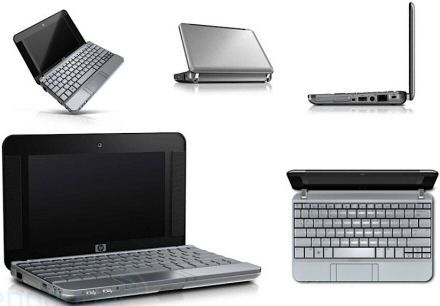
The HP MiniNote is a compact little laptop made so it’s easier to move around, do simple computing stuff, and not fuss too much. It’s aimed at people who want something really portable for daily chores , and the MiniNote does that by pairing a small body with just the essentials. In this review i’ll look at the HP MiniNote closely, through its design, speed, display, keyboard, connectivity, battery life,and finally the overall value, so you can get the full picture.
Design and build quality
Compact and portable
The HP MiniNote is pretty well known for that ultra portable vibe, it kind of sits in your hands like a “take it anywhere” gadget. It has a compact chassis, so really you can just carry it along without too much effort, no big fuss. The screen is often about 8.9 to 10.2 inches, so compared with most laptops it feels noticeably tinier, and that makes it a handy choice if you travel, or if you only have limited desk space at home.
Sturdy construction
Even though it is small, the HP MiniNote is still made with durability in mind. The body is made using a mix of plastic and metal, giving you a decent compromise between strength and weight. Overall, the build feels solid enough , but you can tell it’s more focused on easy transport than on being super rugged. The hinges seem firm and the screen opens and closes smoothly, still it’s smart to treat it gently so it doesn’t get damaged from repeated trips.
Portability
The HP MiniNote comes in at about 2.6 to 3 pounds, so yeah it’s pretty light, and it’s also fairly easy to lug around. The whole thing is roughly 8.5 x 6.5 x 1.2 inches , so it usually just slides into a small bag or a thin sleeve, or even a carry case, with out too much fuss. Honestly, the portability factor with the MiniNote is one of those standout points, especially if you want a laptop for “on-the-go” moments, quick errands, or just moving from room to room all day like it’s no big deal.
Display
Screen Size and Resolution
The HP MiniNote has a smaller screen, typically around 8.9 to 10.2 inches, and it runs at 1024 x 600 pixels. To be fair, it isn’t the sharpest setup compared to most full sized laptops, but it still works fine for everyday stuff. Things like web browsing, replying to emails , or dealing with regular office documents feel pretty workable. Also, since the display area is smaller, you’re trading view space for something lighter, and depending on the person, that balance might actually feel better.
Viewing Angles and Brightness
Because the MiniNote uses a pretty standard LCD panel, the viewing angles are limited, especially when you compare it to more modern IPS style screens. Colors and brightness can look kind of uneven if you’re not looking straight at it. It’s mildly irritating if you’re trying to show someone what’s on-screen, or if the room lighting keeps shifting every few minutes. Indoors it’s usually decent enough, but outside, or in direct sunlight, it may struggle a bit.
Screen Glossiness
So, the MiniNote usually has a glossy screen surface. That kind of finish does make colors look more vivid, and it can look really nice…but in really bright places it also causes reflections, plus glare, you know. If you’re using it near windows or under strong lights, it might feel kind of distracting , sometimes. On the other hand, people who mostly work in darker rooms may barely notice it as much.
Performance
Processor and Memory
On the performance side, the HP MiniNote tends to come with entry-level chips, things like Intel Atom or AMD Geode. They’re mostly picked for low power use and simple tasks, like email, quick web pages, basic typing, and light media. For everyday stuff, it can feel fine, but when you try heavier applications, or you multitask a lot , it may start to lag or feel slow.
Storage
For storage, the MiniNote is offered with smaller hard drives, or solid-state drives, the SSD type, in the ballpark of 60GB to 128GB. Yeah, compared with newer laptops this might sound modest. Still, for essential documents, school or office files, and a small amount of photos or media, it’s typically workable. If you end up needing much more space, then external drives or cloud storage become the more sensible path, basically.
Graphics
The MiniNote has integrated graphics inside, like Intel GMA or AMD Radeon, and they work fine for basic visual stuff, for example video playback and light image work. Still, these built in graphics might not cut it for the more demanding things, such as gaming, or heavy high resolution video editing. In other words, the graphics output is ok for what the MiniNote is meant to do but it can feel limited if someone wants more graphic muscle.
Keyboard and Trackpad
Keyboard
The keyboard on the HP MiniNote is pretty small, which matches the overall size of the laptop. It’s usable for simple typing, but the smaller key area and tighter gaps between keys can make it a bit less comfy, compared to regular full sized keyboards. The keys do have a decent amount of travel and tactile feedback, though, but if you have larger hands you may notice fatigue during longer typing stretches.
Trackpad and Input Devices
The MiniNote trackpad is also relatively small, so you might need to adjust the way you move and handle your mouse hand. Even so, it tends to be responsive and it supports basic multi touch motions like scrolling and zooming. There are also dedicated mouse buttons on the laptop, which some people like more than touch based controls. Overall the trackpad gets the job done, but it likely won’t feel as precise or as easy to use as the bigger trackpads you see on standard laptops.
Connectivity
Ports, Expansion
The HP MiniNote shows up with a pretty basic bunch of ports, which honestly sort of fits the little tiny chassis. You typically see things like:
USB ports: One port, or sometimes two USB 2.0 sockets, for plugging in extra accessories
VGA port: For connecting an outside screen or projector when you need it fast
Ethernet port: For a solid wired network link
Headphone/Microphone combo jack: For both audio in, and audio out
That smaller port count can feel a bit constraining if you’re trying to hook up a whole set of extras at once, like printers, storage drives, adapters, and all the other bits. Plus the absence of USB 3.0, or USB-C is noticeable, because these newer connections generally shuffle data faster, and they tend to be more flexible with today’s accessories.
Wireless Connectivity
Battery Life
Longevity
Battery performance on the HP MiniNote really depends on the exact build, and how you treat it day to day. Most users should expect something around 3 to 5 hours per charge. Of course that figure can swing, depending on screen brightness, the power saving options you choose, and what kind of things you’re actually running.
Power Management
The MiniNote has some pretty basic power management features that, in practice helps squeeze out a bit more battery life. Users can set up power options straight from the operating system, so when power availability is low the system kind of stays in a low-energy mode. Also, the laptop uses low-power parts which tends to keep battery usage fairly efficient, but if someone has more demanding needs they might end up recharging quite often or more frequently.
Audio and Webcam
Audio Quality
The HP MiniNote includes built in stereo speakers for day to day use and simple listening. The sound is usually okay for video calls, quick presentations and casual media viewing. Even so the speakers do not really have much depth or loudness, so it can feel limiting if you want richer audio for music, entertainment, or whatever you’re streaming at the time.
Webcam
The built in webcam on the MiniNote typically uses VGA resolution, so it delivers decent image quality for meetings and calls. In normal lighting it performs pretty reasonably, but in darker rooms it may struggle, leading to grainy footage or footage that looks less clear. So for people who join video conferencing a lot, an external webcam might be the smarter way to go.
Software and User Experience
Operating System
The HP MiniNote usually ships with a Windows version, for example Windows XP, Windows 7 Starter, or Windows 10 depending on the specific model and when it was purchased. The system provides a familiar environment and it supports a range of productivity and business applications. Windows XP or 7 Starter feels more straightforward, with a basic set of tools, whereas Windows 10 adds extra functionality plus continued security updates.
Pre-Installed software
The MiniNote could arrive with pre-installed software , like tools meant for system upkeep, security, and general help. You may run into things like HP Support Assistant, a couple recovery utilities, and short term or trial flavors of antivirus. Some people might find these extras pretty handy, but others kinda want a cleaner start, no extra bloatware, you know, just that fresh setup feeling.
Pros and Cons
Pros
Portability: The MiniNote’s little frame and its light build makes it pretty easy to carry around, so it fits folks who need a laptop while they’re on the move a lot.
Affordability: The HP MiniNote is typically priced fairly within the netbook range, so you get decent value for daily basics like browsing, school work , and emails, without your budget getting drained.
Basic Functionality: If your main goals are simple—web surfing, messaging, and editing documents—the MiniNote can handle normal everyday use just fine.
Durability: The whole build feels solid, not weak or flimsy, and the tougher chassis seems made to survive day to day life plus some traveling.
Port Selection: Even though it’s a compact device, the MiniNote still has the important connections available, USB ports , Ethernet, and a VGA port, so you can attach different peripherals with less stress.
Cons
Limited performance: the MiniNote’s entry level processor plus integrated graphics can end up feeling a bit under powered, especially with heavier apps or when you multitask a lot, so its flexibility ends up being kinda tight.
Small display: the small screen and the lower resolution might not suit people who need more space for work, spreadsheets , or long media sessions, since you can feel the viewing area is cramped.
Keyboard and trackpad: the compact keyboard together with the trackpad could be less comfy during longer stretches. If you have larger hands or you type frequently you might notice some strain, even if it’s “fine” at first.
Limited battery life: with about 3 to 5 hours on average, you may need a recharge more often, particularly if you’re out and using it away from a charger for hours.
Outdated tech: the MiniNote comes with older specs, and there’s no real support for some newer standards, like USB 3.0 or higher Wi‑Fi options. If you care about modern connection and performance, this may feel less appealing.
Final Verdict
So, The HP MiniNote is kind of a solid option if you want something really portable for basic work , you know like documents , browsing, and light stuff . The compact body, the relatively low cost , and honestly decent performance make it feel practical. It’s a good fit for people who care more about portability and cost- effectiveness than they do about advanced features or top-tier speed.
Now, the MiniNote might not be the best match if you’re doing more demanding computing, heavy multitasking, or anything that really pushes a system. Still, for everyday tasks and travel, its value doesn’t really get overstated. The build quality is fine, the basic functionality works as expected, and the pricing stays competitive, which means you get a pretty solid return for the money you put in.
For anyone who needs a more powerful machine, or has specific requirements like higher resolution displays, stronger graphics performance, or a longer battery run time , you might want to look at other alternatives . But if you’re looking for a simple, portable, budget-friendly laptop for standard use then the HP MiniNote keeps showing up as a viable, practical choice.
In short, the HP MiniNote shines in portability and affordability, it works well for anyone needing a compact device for daily tasks. With its basic performance, a sturdy construction, and that competitive pricing, it delivers a clear value proposition in the netbook space.
HP 2140 Mini-Note – Atom N270 / 1.6 GHz – RAM 2 GB – HDD 160 GB – GMA 950 – Gigabit Ethernet – WLAN : Bluetooth 2.0 EDR, 802.11 a/b/g/n: Buy it now
Related Posts

Tech Reviewer & Product Analyst
Định Bia has spent over 10 years testing consumer electronics with a focus on smart technology. He work as a product advisor at Biareview where he helped customers find the right devices for their needs. He personally tests every product featured on this site using a consistent evaluation framework covering quality, durability, and value. All reviews are based on experience, not influenced by the manufacturer.