
Table of Contents
amazon Hauppauge Colossus reviews
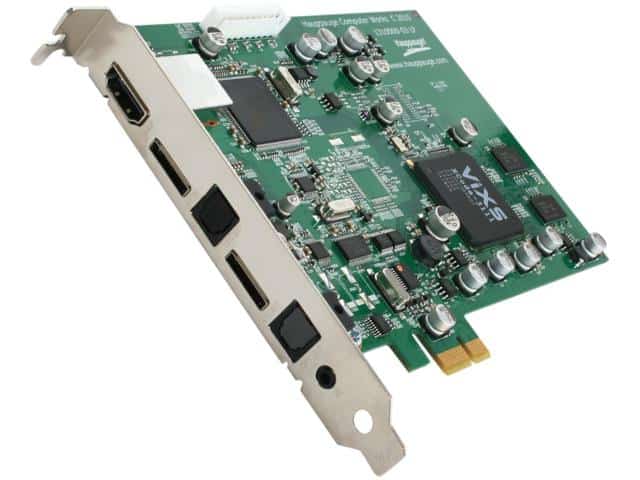
Hauppauge Colossus is one of the few video capture cards on a computer that supports HD video recording (1080i), which of course is unsuitable for home but suitable for filmmakers. .
The card is built in, through the PCI Express x1 slot of the computer. Simple card design, sophisticated circuit board, using solid capacitors to increase product life.
The card has two interfaces: A / V input and output (with cable included), 2 optical fiber output / output, HDMI input (for non-encoding signals), and IR input for remote control.
Remote control, suite of applications including ArcSoft “ShowBiz” for recording, editing and burning to disc and Hauppauge application WinTV v7 for remote control, Component cable and IR wire.
ArcSoft’s built-in card lets you easily capture video from any source via HDMI, Component, Composite with Full HD (1080p) quality. We connect to the Xbox 360 to capture and export to the Mp4 file format. In addition, AcrSoft software also supports TS and M2TS video formats. However, note that you can hardly play games directly through this video capture screen because the signal transmission delay is about 1 second.
And we try to get another HD source from the satellite receiver via HDMI. Although the input signal is only 720p, the software is recording at 1080p and you have no option to adjust the 720p level to match the input source.
Key Features
High Definition Video Capture: Supports high definition (HD), 1080p video capture at 30 FPS with the potentiality to record high-quality videos either from gaming consoles, PCs, or any other HD source. Video Encoding: Has hardware video encoding to ease the load on the CPU while recording/streaming smoothly.
HDMI Input and Output: With HDMI input and output, it can capture video from an HD source whilst passing the signal through to a monitor or other display device.
Comprehensive Software Suite: Software tools are offered for capturing, editing, and streaming video content.
Installation and Setup
Hardware Installation
Required Components
The following will be needed in order to install the Hauppauge Colossus:
Hauppauge Colossus Capture Card: The main component that goes into the PCI Express slot of your computer.
PCI Express Slot: Make sure your computer has a free PCIe slot for this card.
HDMI Cables: To connect video sources and output devices.
Power supply: Unless a good-quality one provides power to the card, it cannot function.
Installation Process
Power Down the Computer: Ensure the capture card is installed only when the computer is shut down and unplugged from the electrical outlet.
Open the Computer Case: Take off the side panel of the computer case to reach into the inner components.
Locate the PCIe Slot: Identify an empty PCI-express slot on the motherboard.
The Colossus is typically expected to go into a PCIe x1 slot but can also go into x16 slots.
Install the Capture Card: Set the Hauppauge Colossus firmly into the PCIe slot and fasten it with the appropriate screws or brackets. Ensure that you firmly seat it in the slot.
Reconnect Cables: Connecting the HDMI input cables and output cables to the capture card. Make sure your cables are securely connected to your video sources and display devices.
Close the Computer Case: Secure the side panel back on to the computer case again.
Software Installation Driver
Installation Download Drivers: Go to the Hauppauge website and download the newest drivers for your Colossus. Make sure to choose the right drivers for your operating system.
Run the Installer: Launch the driver installation program and follow all the on-screen instructions until the drivers are installed.
Restart the Computer: Once the installation is complete, restart your computer to fully load the drivers.
Software Suite Installation
Install Hauppauge Software: Colossus comes with a software suite that includes capture, streaming, and editing software. Follow the instructions to install the software.
Configure Settings: Run the Hauppauge software and set it up to your liking. This may include setting video sources, resolution, and encoding options.
Performance and Features
Video Capture Quality
HD Video Capture
Hauppauge Colossus supports 30fps capture at 1080p. It can capture the gameplay in HD, recording at a high quality. The captured video is usually crisp and clear, maintaining the video source’s original quality and detail.
Video Encoding
The Colossus offers hardware video encoding that takes video encoding from the CPU onto the capture card for better performance and reduction of the system resource use during recording or streaming. The hardware encoding maintains high video quality and avoids lag or performance troubles.
Software Features
Capture Software
The Hauppauge video capture software suite can capture videos from different sources. The software enables users to set capture options, such as resolution, frame rate, and encoding format. Other capture parameters include scheduling recording, automatic file naming, etc.
Streaming
Live streaming is supported by Colossus, allowing users to stream content to Twitch or YouTube. With the program, users can set up streaming profiles, adjust bit rate, and tweak streaming settings. The streams can also be augmented with overlays, alerts, and many other awakening elements.
Video Editing
The software suite can perform basic editing operations, such as trimming, cutting, and merging. Users cannot only trim and cut but also attach titles, transitions, and effects to their recordings. While these are not meant for advanced video editing, at least the basics can be done with the help of this software.
Connectivity Options
HDMI Input and Output
The Hauppauge Colossus has HDMI input and output for capturing from HD sources and passing through the signal to a monitor or any other display devices. This feature comes in handy for gamers who want to capture gameplay while also watching it on a separate screen.
Audio Capture
The Colossus captures audio alongside video. Users can capture audio from HDMI sources or from external audio devices connected to the computer. The software also offers options for audio level adjustment and audio-video synchronization.
where can you get a Hauppauge Colossus online
Hauppauge Colossus PCI Express Internal HD-PVR: Buy it now

Hauppauge Colossus 2 PCI Express Internal 1080p HD-PVR: Buy it now

Hauppauge Colossus 2 – video capture adapter – PCIe – By NETCNA: Buy it now

NEW Colossus PCI Express HD Video (Video Specialty Products): Buy it now

After editing the video at the basic level in the Edit tab, ArcSoft software lets you create video content in popular formats such as DVDs, create files or automatically upload to YouTube. This feature is quite convenient but not many options.
In addition to ArcSoft movie editing software, the card also includes WinTV software for watching TV shows. Although this software is quite “professional” for watching and recording television but perhaps because the card is not designed as a function as a TV card, the card does not have TV tuning function that you have to adjust itself. Via the Set-top Box connection in the TV. The most difficult part of the setup is that you need to synchronize the remote control of the card with the set-top box of the TV service.
It is possible to see Hauppauge’s Colossus card quite well if you want to record video from a variety of sources for your computer. The recording quality of the card is very good, which can be a tool for image processing.
Comparison with Other Capture Cards
Hauppauge Colossus vs. Elgato Game Capture HD
Video Capture Quality
Both the Hauppauge Colossus and Elgato Game Capture HD offer high-definition video capture. The Colossus supports 1080p at 30 FPS, while the Elgato Game Capture HD supports 1080p at 60 FPS. The higher frame rate of the Elgato may provide smoother gameplay capture.
Software Features
The Elgato Game Capture HD software is known for its user-friendly interface and robust features, including advanced streaming options and video editing tools. While the Hauppauge software suite offers similar functionalities, the Elgato software may be more polished and feature-rich.
Connectivity
Both capture cards offer HDMI input and output. The choice between the two may come down to specific feature preferences and compatibility with your system.
Hauppauge Colossus vs. AverMedia Live Gamer HD
Video Capture Quality
The AverMedia Live Gamer HD supports 1080p video capture at 60 FPS, offering a higher frame rate compared to the Colossus. This can result in smoother and more fluid video capture.
Software Features
The AverMedia software suite includes features such as live streaming, video editing, and custom overlays. It is known for its versatility and ease of use. The Hauppauge software also provides similar features but may differ in terms of user interface and functionality.
Price and Value
The pricing of both capture cards may vary based on retailers and promotions. Consider the value of additional features and performance differences when making a decision.
Common Issues and Troubleshooting
Installation Problems
Driver Issues
If the capture card is not recognized or does not function properly, ensure that the latest drivers are installed. Check for compatibility with your operating system and update drivers if necessary.
Hardware Conflicts
Ensure that the Colossus is properly seated in the PCIe slot and that all cables are securely connected. Check for any hardware conflicts with other components in your system.
Video Capture Troubles
Poor Video Quality
A poor video quality can be a symptom of having faulty HDMI cables or improper connections. Furthermore, one should consider setting the capture software settings to match the resolution and frame rate of the source video.
Audio Sync Issue
Respective instances of audio could be asynchronous with video stop due to an offset; settings for audio delay will be altered for audio synchronization with the video.
Streaming Issues
Stream Lag
Due to high bitrate setup options or network problems, this stream lag could surface. Accordingly, adjust bitrate and stream settings on the software for maximizing efficiency. Check that your internet connection is stable enough to support streaming.
Encoding Issues
Encoding problems can be blocked by the setting for hardware encoding, which may be malfunctioned capture cards then try to update the software and drivers to fix compatibility issues.
Advantages and Disadvantages
Advantages
High-Quality Capture: Supports 1080p video capture at 30 FPS, resulting in clear and detailed recordings.
Hardware Encoding: Offloading encoding tasks from CPU to capture card makes better performances and lowers system loads during recording and streaming.
HDMI Input and Output: Enables capturing video from HD sources while simultaneously sending through video signals to other devices, ideal for gaming setup.
Extensive Software Suite: Provides tools for capturing, streaming, and editing video, making it one of the few full-blown packages available for content creation.
Flexibility: Accepts various video sources such as gaming consoles, PCs, and other HDMI-enabled devices.
Disadvantages
Frame Rate Limitation: Colossus only supports 1080p at 30 FPS, which would be insufficient to some users who require higher frame rates for a smooth presentation of video, such as 60 FPS for games.
Limited Features: While the Hauppauge software suite works fine, it lacks some of the advanced options and polish of competing products like Elgato or AverMedia.
Possible Driver and Compatibility Issues: Occasionally, user compatibility and driver issues may crop up, especially with newer operating systems or hardware configurations.
Price: Depending on the bumps, the Hauppauge Colossus could be more expensive than some of his competitors; this maybe a consideration for a budget buyer.
Conclusion
The Hauppauge Colossus is still a good go-to option for any customer who wants a high-definition video capture card with excellent performance and a myriad of features. It boasts hardware encoding better than any other, supports HDMI connectivity with vast flexibility, and remains an stellar software suite contender. Having said, its drawbacks include limiting itself to 30 FPS and exhibiting software limitations vis-à-vis newer models and competitors.
One must really consider one’s needs before accepting the Hauppauge Colossus: frame rate requirements versus software versus price. A strong contender for those whose needs are 30 FPS HD capture at supreme quality can be Colossus. Others who may demand higher frame rates or better software may want to start looking into the Hauppauge Colossus 2 or Elgato HD60 Pro alternatives.
By-and-large, the Colossus is a dependable and functional piece of hardware still able to capture and stream HD video for and by the gamers, content creators, and the video connoisseurs.