
Table of Contents
amazon Sweet Home 3D reviews
You are planning to design, decorate the furniture in the house, but no knowledge of graphic design. Sweet Home 3D will help you do that.
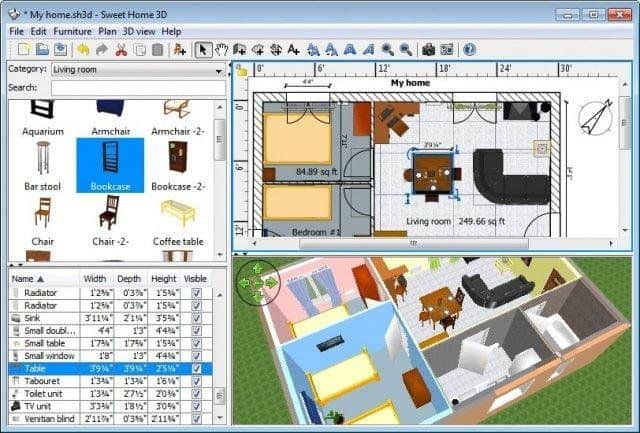
The design of the apartments seemed only architects are trained now easier than ever with the help of design software Sweet Home 3D. You can manually create these unique apartments, arranged the furniture in the house, home décor preferences without much difficulty. Sweet Home 3D will help you with a set of furniture design is a 2D and 3D preview. It will turn the tedious task of finding and furniture placement simpler and more enjoyable. Once completed, you will have fun while looking at her own design house, your style.
Outline
Sweet Home 3D is a very useful interior design tool that lets one come up with detailed floor plans and 3D visualization of interiors. Developed with flexibility by eTeks, Sweet Home 3D is geared toward homeowners, interior designers, architects, and all who are interested in accurate and creative planning and decoration of a living area; this review will explore the software from key features and usability through design tools and rendering, interface and community support, pricing, and effectively turning a design idea into a virtual reality.
About the Company
eTeks, which created Sweet Home 3D, commissions itself as a software company that values intuitive and user-friendly applications. Founded by Emmanuel Puybaret, eTeks offers products enabling users to design and visualize architectural projects, interior spaces, and home improvements. Sweet Home 3D stands for eTeks’ principle of combining efficiency and accessibility: professional design tools made accessible to a large number of people.
Key Features and Functionality
1. Easy and Intuitive Interface
User-Driven Design: The profile graphical user-interface offers a very simple way of understanding the application with navigation tools that are directed almost entirely to the learning of the whole design process ranging anywhere from a beginner to a very advanced designer.
Drag, Drop, and Model Arrangement: Objects can then be manipulated by dragging and dropping elements such as furniture, fixtures, doors, and windows into a two-dimensional floor plan grid that makes for adequate arrangement tools and ultimately allows easy creation of rooms.
Configurable Grid and Snap: Snap and grid tools help keep the precise count in the placement and alignment of objects allowing users to rightly put others in their floor plan.
2. Object Library
Furniture and Decor Items: The interior design application comes with an enormous library containing furniture, appliances, lighting fixtures, decor items, and household accessories of all styles and periods to aid in proper design visualization.
Customization: User-defined dimensions, colors, textures, and materials are used according to the user’s preference and project requirements.
Import/Export Functions: Import additional 3D models and furniture libraries in the following formats: .OBJ, .3DS, in order to widen design and customization options.
3. Advanced Build Tools
Room Design and Measurements: Provides a horizontal design and measurement in detail of rooms, walls, doors, windows, and adjustments in the sizes of all templates of rooms.
Texturing and Material Editor: Textures and materials can be applied to surfaces, walls, floors, and objects, thus increasing realism and aesthetics in 3D renderings.
Ceiling and Floor Options: Customization of ceiling height, the material of the floor, tiling pattern, and the details of the floor plan in compliance with architectural and design needs are offered.
4. Real-Time 3D Visualization
3D Preview and Rendering: The designed spaces get a real-time view for 3D visualization to allow the user to explore and navigate virtual interiors from multiple viewpoints.
Lighting and Shadow Effects: Simulates the effects of both natural and artificial light, projecting shadows and reflections realistically for improving visual quality and ambience in rendering scenes.
Walkthrough Mode: This lets the dynamic and immersive experience of 3D model walkthroughs introduce and navigate a designed space for clients, stakeholders, or personal visualization.
5. Annotation and Note Taking
Annotations and Measurements: This supports adding annotations, measurements, and notes into a floor plan or 3D model, hence providing an avenue for communication and collaboration during the design process.
Documentation of the Project: This provides the ability to generate reports that can be printed together with the floor plans and 3D images and can be used for presentation, client meeting, and project documentation purposes.
6. Export and Sharing
File Export Format: This allows users to export designs into different formats (PNG, JPEG, SVG, PDF) for sharing, printing, or their inclusion in presentation and documentation.
Integration with Other Programs: This integrates with CAD software and 3D modeling tools to facilitate smooth workflow integration and interoperability.
User Interface and Usability
Sweet Home 3D’s user interface is designed to foster the design process and stimulate user productivity:
Customizable Layout: It allows the user to customize interface layouts, toolbars, and shortcuts according to individual preferences and workflow necessities.
Contextual Menus and Tooltips: Contextual menus and tooltips provide complementary support with guidance and information on the functioning of the tools, making the software easy to use for all its users, whether they are new or experienced.
Multi-Language Support: The software supports multiple languages, making it available for a global user base and thereby supporting inclusivity in design education and practice.
Works and Rendering Quality
In terms of performance, it has been optimized to provide fast rendering and visualization:
Rendering Speed: Efficient rendering engines are designed with optimal speed and quality so that the user can produce 3D models and visualizations in minimum time without any loss of realism.
Hardware Requirements: These moderate hardware requirements are thus compatible with a wider spectrum of the users’ installations and operating systems (Windows, Mac OS, and Linux).
Stability and Reliability: Performance is stable, with rarely any crashes or system errors, making a trustworthy environment for uninterrupted design and project development.
Community Aid and Resources
Sweet Home 3D has an excellent community of users and resources that all contribute towards its development and end-user experience:
User Forums and Communities: Active forums and discussion boards as well as online communities for the purpose of sharing tips, exchanging ideas, asking for advice, and showcasing designs.
User-Generated Content: There is access to user-generated furniture libraries, textures, and design templates downloadable from the web, thus increasing both options for designs as well as customization possibilities.
Online Tutorials and Documentation: Exceedingly exhaustive tutorials, user guides, video demonstrations, and FAQs, offered by eTeks and contributors from the community with the aim of assisting the practitioner in the learning process toward increased skillfulness.
Pricing and Licensing
Sweet Home 3D has flexible pricing options for different needs and budgets:
Free Version: The Free version provides the basic software functionality, some of the key features, as well as limitations about object libraries concerning use in personal spaces or to explore design capabilities.
Paid Version: Premium version grants a wider range of uses of the software, an object library that is fully accessible, and other available advanced personalization options for ever-once purchase or annual subscription.
Educational Discounts: Students, teachers, and academic institutions get discounts to encourage the practice of learning and the use of this software in the classroom.
User Feedback and Criticism
Some good things and important things regarding Sweet Home 3D came out of the feedback given by users:
Engageable media resources to make it much simpler to use, an enormous object library, realistic 3D rendering, precise measurement tools, customizable design options, compatibility with cross-platform, and a very active community support.
Disadvantages: A learning curve for new users who are not familiar with any form of CAD or interior design software; sometimes the application is very slow with complex projects. The advanced architectural features are also lesser than professional CAD software.
Conclusion
One more affordable yet highly powerful interior design software is Sweet Home 3D that allows making detailed floor plans, visualizing interiors in 3D, and bringing design ideas into reality – making everything more precise and creative. Whether you want to renovate your home, access utilities for decorating your spaces, or provide a design proposal to a client, Sweet Home 3D offers everything.
It is yet intuitive enough so homeowners, interior designers, educators, and all proponents of architecture could rely on it because of its broad object library, powerful design tools, and realistic rendering. Sweet Home 3D has continued to be a most wanted choice for any home owner, interior designer, educator, or architecture enthusiast with its regular updates and participation from the user community and the user positive design philosophy. It will always be a trailblazer in developing digital design tools helping users dream about spaces attaining them easily.
where can you get a Sweet Home 3D online
Sweet Home 3D [Download]: Buy it now

Sweet Home 3D Interior Home Design CAD Software – Windows Version: Buy it now

The main feature of home design software Sweet Home 3D
Draw straight, round or sloping walls with precise dimensions using the mouse or keyboard.
Installation of doors and windows in walls by dragging them into the drawing, and let Sweet Home 3D compute their holes needed on the wall.
Add furniture for drawing from a list searchable catalog and expanded as the kitchen, living room, bedroom, bathroom …
Change the color, texture, size, thickness, position and orientation of furniture, walls, floors and ceilings.
While designed as 2D, simultaneously view it in 3D from an aerial position, or adjust the direction of looking at it as a virtual guest.
Annotate drawings with regional names, dimension lines, texts and show annotations thidinh direction with a compass.
Creating false images and video clips made with the ability to customize the effects of sunlight on the time of day and geographic location.
Add a detailed drawing on the wall for it to draw, add 3D models to perfection to catalog and edit text and its interface.
Printing and output to PDF, bitmap or vector images, videos and 3D files with standard file formats.
The extended features of Sweet Home 3D with plug-ins programmed in Java, or be developed as a version based on the Model View Controller architecture.
Users can choose the interface and guides, supports over 22 languages.
Request:
Java Runtime Environment.