
Table of Contents
amazon D-Link DNS-320 reviews
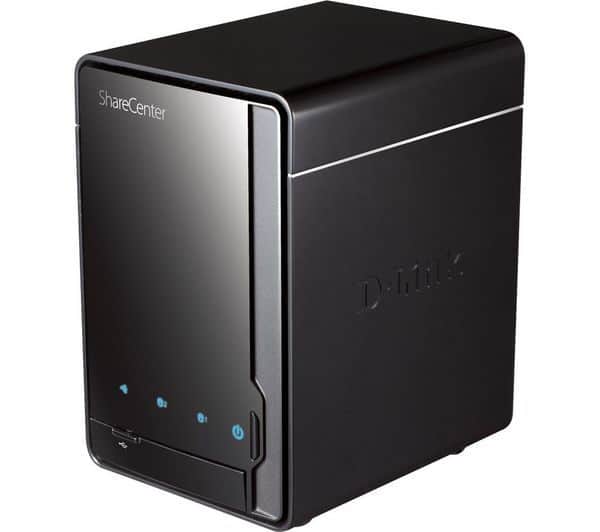
With the D-Link DNS-320, you can securely store, share data for everyone to use and plan important backups.
The D-Link DNS-320 ShareCenter Pulse hard drive is designed with a glossy black finish.
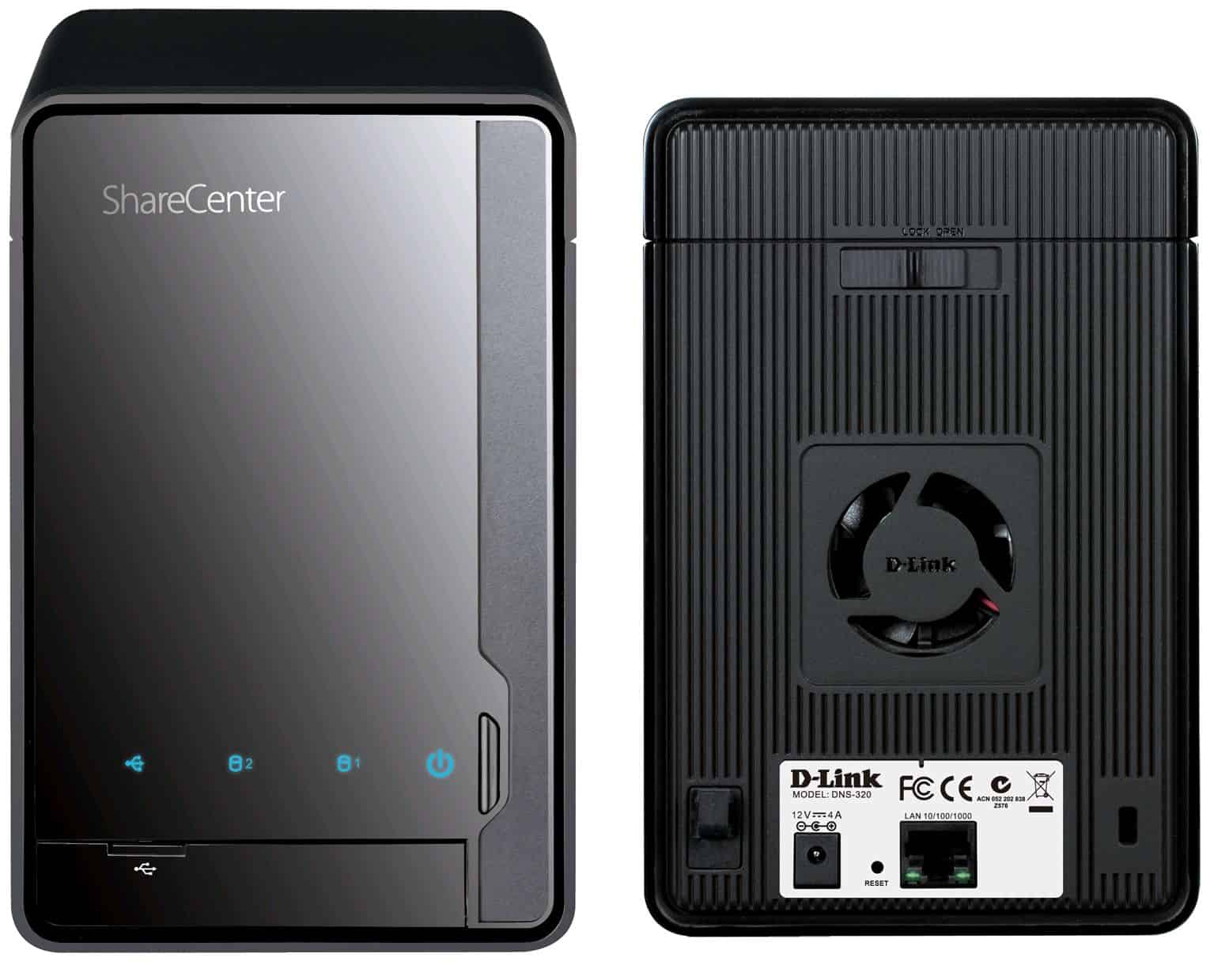
The front is the power button and the signal lights.
The compartment has a separate lid containing a USB port and a USB copy button (used to copy the contents of the storage pen to the DNS-320).
The back is a high-speed Gigabit ethernet port, 12V power port (adapter included), 40mm fan cooled, quiet but still effective, allowing the unit to operate for long periods without heat.
The top cover can be easily removed by hand without the need for tools.
Two 3.5″ SATA hard drive bay.
The D-Link DNS-320 Network Copier Pulse supports two 3.5″ disk chambers, easily removable by hand without the need for tools. The front is the power button and the signal lights, the USB storage bay and the USB copy button have their own covers. The back is a high-speed Gigabit ethernet port, 12V power port (included adapter), quiet 40mm fan cooled but still effective, allowing the unit to operate for long periods without heat during the test.
Design and Build Quality
The name D-Link DNS-320 is quite plain for a minimalist design that focuses on the nuts and bolts. Its enclosure comes in glossy plastic, with a tawdry black color that exudes a lack of attention; these characteristics mean it would fit happily into most home or office environments. The classy finish just might appeal to those who want their tech to blend in with the environment.
Dimensions: 4.1 x 7.8 x 5.1 inches (104.3 x 199.7 x 129.3 mm)
Weight: Approximately 1.23 kg (without drives)
The plastic chassis should not have made it feel flimsy, for the DNS-320 feels adequately sturdy and durable. A rather simple LED indicator setup adorns the front panel, informing one about drive status, network traffic, or power. Behind the front panel lies a slide-out drive tray system; the front cover can be pulled off, making hard-drive installs or replacements completely tool-free.
The cooling is handled by a fan located at the rear, maintaining an optimal temperature while remaining very quiet. Yes, it is a good fan; however, in an environment with some background noise, it stays fairly silent.
Hardware and Specifications
The DNS-320 is equipped with hardware that ensures basic NAS functionality without going overboard in terms of performance. It is not a power machine, but it provides adequate power for general home or small office tasks.
Processor: 800 MHz Marvell CPU
Memory: 128 MB DDR2 RAM
Drive Bays: 2 x 3.5-inch SATA I/II
RAID Support: RAID 0, RAID 1, JBOD (Just a Bunch of Disks), Standard Ports: 1 x Gigabit Ethernet (10/100/1000 Mbps)
1 x USB 2.0 for external drives or printers
Cooling: 60 mm rear-mounted fan
Data is kept secure or just made fast for its owners with two 3.5″ SATA hard drives supported by the DNS-320-B with RAID 0, RAID 1, and JBOD configurations. Not that it would have, the 128 MB of RAM and the clock speed of the 800 MHz processor have become the laughing stalks of the industry, but their power suffices for the intended role of the DNS-320-B as a network storage server for private/small-office use.
where can you get a D-Link DNS-320 online
D-Link DNS-320 ShareCenter 2-Bay Network Storage Enclosure: Buy it now

D-Link ShareCenter DNS-320L 2-Bay Cloud Network Storage Enclosure: Buy it now

The included CD provides PDF file installation instructions, the D-Link Easy Search utility that quickly detects the IP address of existing equipment on the network and the FarStone TotalRecovery 7 Pro software for automatic backups, data recovery.
After installation with a step-by-step wizard with lively visuals you can access to configure and manage the DNS-320 network hard disk through a web browser. From this beautiful web interface, you can shutdown, restart device, create user accounts, create groups, quota, update firmware, power management, check hard disk status, configure RAID (Supports RAID 0/1, JBOD standards), set up email alerts, and more. The DNS-320 also supports server services such as FTP, UPnP, iTunes, Time Machine, and more. The Link Layer Topology Discovery (LLTD) feature allows new Windows versions such as Vista / 7 to be easily recognized and included list network device.
The installation also allows registration of D-Link’s free DDNS (Dynamic DNS) service at DLinkDDNS.com. In just a few easy steps, Test Lab was able to access the configuration and use of DNS-320 applications from the Internet with ease. Testing the pen storage on the front port, Test Lab can access the pen via Windows Explorer as well as copy the entire content on the pen into the DNS-320 easily with the USB Copy button on the front.
Features and Software
The D-Link DNS-320 is high in options and offers something for a broad clientele, those looking to manage personal files and small companies looking for steadfast file-sharing solutions.
a. File Sharing and Accessibility
DNS-320 does well as a file server, and currently, it supports nearly all protocols: SMB/CIFS, FTP, and WebDAV-based file sharing across Windows, macOS, and Linux clients. This kind of flexibility means that the DNS-320 can fit into just about any network.
It supports creating multiple user accounts and groups, and assigning specific permissions to folders or drives. This solution fits well in an environment where multiple users require access to various sections of data, with a measure of privacy and security.
b. Backup Solutions
Backup is one of the most important roles a NAS plays, and the DNS-320 has a number of mechanisms to back your data up. It supports scheduled backups from computers or outside devices onto the NAS, as well as local backups in between drives or external USB devices.
It is Time Machine–compatible for Mac users, thus being perfect for any macOS user. Also, the DNS-320 supports incremental backups so that one need not remember to save every new file manually.
c. Media Streaming
An attractive feature offered by the D-Link DNS-320 is its functionality as a media server. It supports the UPnP AV media server protocol, designed to stream music, video, and photo content to compatible devices, which include smart TVs, gaming consoles, and media players-PlayStation or Xbox.
Besides that, the device supports DLNA media streaming, which makes the device compatible with a lot of other devices. Users could at ease managing and streaming the content in the whole house network without bothering to access the NAS directly.
d. Add-Ons and Extensibility
While the DNS-320 comes with a handful of pre-installed applications, it is versatile enough to be extended with additional add-ons. There is support for a handful of third-party plug-ins, including cloud-access applications, BitTorrent downloads, and a few more utilities. Although not quite as broad in scope as some of the higher-end NAS devices, this customization does add a level of flexibility to which the DNS-320 may otherwise lack.
Performance Analysis
a. Read and Write Speeds
Read and write speeds are considered when measuring the performance of any NAS. The D-Link DNS-320 performs well when compared to NAS devices in its price range; its real performance is mostly impacted by the type of drives installed and the selected RAID configuration.
Average speeds observed under Gigabit Ethernet conditions in an ideal setting are:
Read Speed: 40-50 MB/s (approximately)
Write Speed: 30-40 MB/s (approximately)
While these speeds suffice for file sharing and backup purposes, in comparison with the higher-end NAS models, they really fall on the low side. Those users handling more hefty files, especially big video projects like video editors and creative studios, would not find these speeds very accommodating.
b. RAID Configurations and Performance
The DNS-320 offers several RAID configurations, with RAID 1 being the most common form of data redundancy. Data are mirrored onto both drives under RAID 1, so if one side of the array suffers from a disk failure, the data remain accessible. This is entirely opposite became it gives better performance by dividing the data across two drives, but it has no form of redundancy. The JBOD (Just a Bunch of Disks) synchronizes the two drives into one storage volume; however, it also has no form of redundancy.
While RAID 1 is most recommended for those who really need data protection, RAID 0 or JBOD are for those with maximum storage concerns or those who are considering performance speed.
Security Features
a. Data Protection
The DNS-320 provides several tiers of data protection. While the RAID 1 mirror is used for redundancy, different user accounts with password protection may be written for restricted access to diversified folders containing sensitive files. Scheduled backups may also be set up for duplicating and safeguarding critical data. The system protects encrypted file transfers to maintain original integrity all the way through.
b. User and Access Control
D-Link makes the DNS-320 easy to manage for user access. Using this structure, the administrator may create accounts with prescribed access rights and restrictions and thus suitable for personal use or for a small office that needs multiple users to view different parts of the storage. The interface is set up to arrange groups, grant permissions to specific folders, and organize file access depending on the role of the user. It is consequently quite useful for workgroups or family members who need to share and secure data.
c. Firmware Updates and Maintenance
These firmware updates fix security vulnerabilities and include new features, a nifty combo that really keeps the D-Link DNS-320 secure and well-equipped with the latest enhancements. In fact, you would find a firmware update setting right in the Web interface, thereby providing any user the ability to update the firmware with minimal technical knowledge. Regular updates will ensure that defenses will be placed against newly found threats, bugs, or performance issues.
Network and Connectivity
The D-Link DNS-320 is fitted with a single Gigabit Ethernet port, providing a high-speed network connection with the capability of handling multiple users and high data traffic, especially on the Local Area Network (LAN) end. While it does not have dual Ethernet ports for link aggregation, which is found in higher-end NAS solutions, the single port is more than enough for most home and small office environments.
The device also has a USB 2.0 port, mostly used for connecting external storage devices or printers. This can be helpful for quickly backing up data to an external hard drive or for shared printing over the network. USB 2.0 may not be the best in speed for data transfer (especially when compared to USB 3.0, which is now the standard on newer NAS devices), but it is still helpful for backup and other such tasks where speed is not the utmost priority.
The User Interface and Ease of Use
One particular feature attractive to D-Link DNS-320 buyers is its intuitive web-based interface. ShareCenter by D-Link is with its slick software almost a perfect example of an intuitive dashboard wherein even an absolute NAS noobie can get about their business without any trouble.
The interface can manage RAIDs, user accounts, shared folders, and scheduled backups. Other advanced configurations are also straightforward to access, covering the setting of an FTP server, UPnP/DLNA media server, and remote access.
While not exactly powerful in number of features offered, the interface makes a nice compromise in simplicity and functionality far too few interfaces find apt to strike. It does not overload a user with too many technical options but instead offers just enough tools to perform commendably well in NAS management.
Remote Access
D-Link DNS-320 supports remote access; users get to access their files with an active internet connection. Through D-Link’s mydlink service, NAS users can access their NAS remotely from either a web browser interface or direct mobile apps. This capability is favorable for users who urgently require access to important files while far from the office or the house.
Once inside the interface, remote access is pretty straightforward to create, and through the mydlink service, managing one’s data from afar is easy; however, the download speed depends on the quality of an internet connection on both ends.
Use Cases: Small Office and Home
Home Use
For an end consumer, the D-Link DNS-320 would work well as an ideal mayor house storage. It has two drive bays supporting up to 8 TB of storage (drive dependent) so perfectly suited to storing pictures, videos, music, and other types of media. The capacity to stream media through the DLNA and UPnP protocols means whichever content the user has can be streamed to devices such as smart TVs, game consoles, or media players, all without requiring a direct connection on the NAS.
Somebody can set up separate accounts for all family members with individual access rights to private folders. Shared family stuff, like photos or videos, would go into common folders for everyone to access. Also, the Time Machine backup for Mac users ensures that all family data is backed up regularly for safe keeping.
Small Office Users
The DNS-320 NAS provides small-business users with a reliable, yet slight variance on the cheap storage of important documents. The RAID 1 capability comes into play for redundancy purposes, keeping the business safe from data loss during situations where a drive fails. It has file-sharing features that allow users to share the same files so that it is easier for users to collaborate in a group work setting.
Granting user permissions provides more than enough benefits for a business in itself. For example, employees with direct access to assigned folders depending on their job role and duties. And it can be set up to back up automatically, so the most important business data is always ready for storage.
The DNS-320 will not have enterprise-level functionality or performance; however, it is perfectly suitable for fulfilling small office needs for basic file-sharing and backup requirements.
Pros and Cons
Pros:
Costs Less: Affordability is probably the most attractive feature to buy D-Link DNS-320. It offers reliable NAS functionalities with the advantage of being very cheap. This makes it ideal for users who are working on a limited budget.
Easy to Set Up: A straightforward plug-n-play setup described by a clear web interface makes this product accessible to users who are otherwise not familiar with NAS systems. Tool-free drive bays are icing on the cake.
RAID Supports: In different configurations (RAIDs 0, and 1), users are empowered to choose between performance or redundancy, the one by themselves.
Media Streaming: DLNA and UPnP support allow it to work as a media server, enabling users to stream content to an array of devices.
Remote Access: mydlink service enables remote access to files, which can be extremely useful to those in need of accessing data through different locations.
Cons:
That Is Not Great Performance: That is great for a small office and home environment. DNS-320 is not truly a high-performance NAS as far as writing or reading; that view may not suit those who deal with huge files or just require fast access.
USB 2.0: Having a USB 2.0 port instead of USB 3.0 limits how fast a user can back up data to an external device, something that would be inconvenient for people requiring fast data transfer rates.
Outdated Hardware: 800 MHz processor and 128 MB of RAM are something at the lower end of the spectrum when seeing expensive hardware as a comparison to more modern NAS devices, which means that in a heavy workload or multiple users connecting simultaneously scenario, this might just turn into a total nightmare.
Limited Expandability: On the upside of having some add-ons and third-party applications available, the DNS-320 cannot really compete with super-extended configurations or app ecosystems on much more advanced NAS solutions, like Synology or QNAP.
Basic User Interface: The user interface, while very easy to use, is somewhat basic and lacks features available on higher-priced NAS systems. Some power users may find it lacking in customization options or advanced networking features.
Comparison with Competitors
Compared against other NAS devices at the same price level, such as Synology DiskStation DS220j or QNAP TS-231P, D-Link DNS-320 holds its ground as an inexpensive, entry-level option. On the other hand, the Synology and QNAP models tend to be more powerful, with a considerably larger app ecosystem and far stronger support for virtualization and cloud services.
Synology DS220j: With a price almost close to that of DNS-320, better hardware, far better UI, and a DMS (DiskStation Manager) with considerably more apps make Synology DS220j the best choice. This is for those that need to go for a bigger feature set and higher performance.
QNAP TS-231P: QNAP provides a faster read/write dual-bay setup with a stronger processor. QNAP also runs a wider list of applications that have good networking support, remote access, and integration with cloud, thus standing as a firm option against DNS-320.
While the DNS-320 provides RAID features, media streaming, and remote access, it is best for people who prioritize price over advanced features or high-end performance.
Final Verdict
The D-Link DNS-320 is an excellent and cheap, entry-level NAS solution for home-based users and small businesses to manage, back up, and share their data. Not having the features or high-speed performance of the costlier ones might be the drawback of this device; however, it does fairly well on cost-to-functionality ratio.
Its strongest features would be ease of use, RAID capability, and media streaming, which would prove useful for any family or small business as well as for beginners looking to get their feet wet into NAS systems. But by all measures, DNS-320 will ever find a tough competitor in other systems like Synology and QNAP for anyone with serious requirements such as fast data access, advanced network features, or cloud integration.
Therefore, D-Link DNS-320 achieves reliability and ease of use at the price of a very basic NAS, thus opening the doors to anyone interested in NAS but not willing to buy an expensive box just yet.