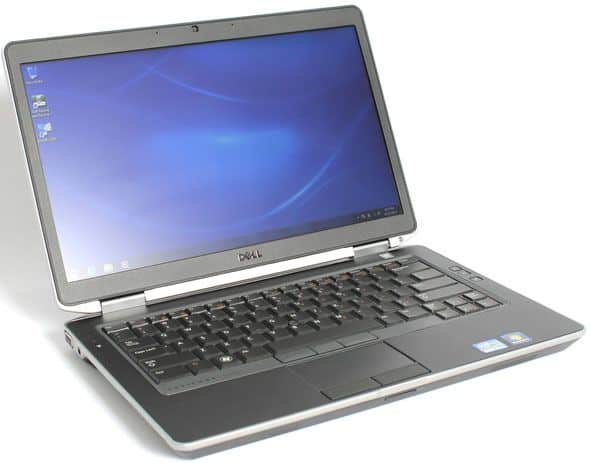
This is a model that marks a lot of change in design versus traditional when it comes to more modern features, despite the fact that the dimensions are still “chunky” and the chassis is durable. Dell is also proud to introduce this is a 14-inch screen laptop, but the size is equivalent to a 13-inch laptop with a thin screen border.
Design
Dell Latitude E6430s “ignores” the trend of the ultra-thin as the ultrabook, but rather rather thick design. However, when held in the hands of this product will give surprise by weight contrast to the design, only 1.7 kg while the normal 14-inch screen laptop is from 2.1 to 2.3 kg . This weight is also smaller than the predecessor E6430, but slightly larger than the rival Lenovo ThinkPad T430s.
The maximum thickness of 30.9 mm makes the internal space of the machine more airy and cooler than the lightweight models. The product has a 14-inch screen, but the edge of the bezel makes the edges of the machine comparable to a 13-inch laptop. However, the cumbersome of thickness will also be a bit inconvenient with the space contained in the balo or bag.
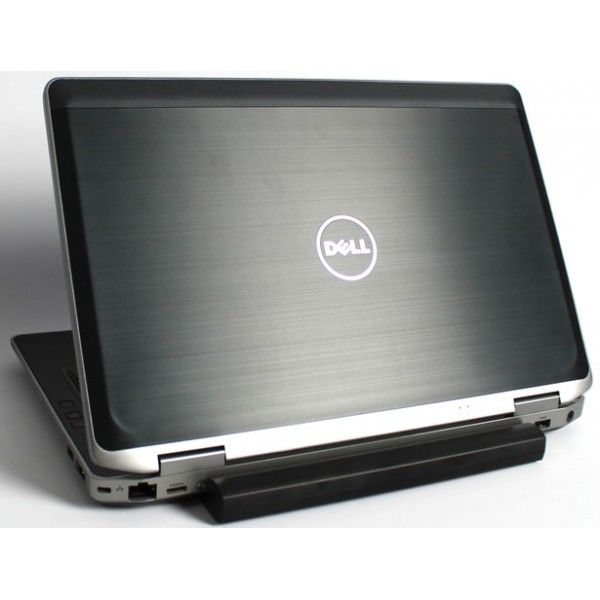
Dell Latitude E6430s is a combination of three metals, including a magnesium alloy chassis, reinforced steel hinges, and finally a scratch-resistant chrome. Dirty fingerprints like normal plastic or aluminum shell. According to Dell, the model meets the US military endurance standard MIL-STD-810G, which provides moisture-proof, dust-proof, shock- and pressure-resistant and extreme temperatures. In addition, the keyboard of the machine is also spill resistant with a small hole to drain the bottom.
Dell Latitude E6430s 14 Inch Business Laptop Computer, Intel Dual Core i5 up to 3.3GHz CPU, 8GB RAM, 1TB HDD, DVD, HDMI, USB 3.0, Windows 10 Professional (Certified Refurbished): Buy it now
Dell Latitude E6430s 14.1 Inch Laptop (Intel Core i5 up to 3.3GHz Turbo Frequency, 8GB RAM, 128GB SSD, Windows 10 Professional) (Certified Refurbished): Buy it now
Latitude E6430s 14″ LED Intel Core i5-3340M 2.70 GHz 4GB RAM 500GB HDD 64-bit Win 7 Pro Notebook: Buy it now
Dell Latitude E6430s 14-inch Premium Business Laptop PC, Intel Core i5 Processor 2.7GHz, 8GB DDR3 RAM, 256GB SDD, Windows 7 Professional (Certified Refurbished): Buy it now
Connect
Despite the design is quite thick, but Dell still arranged the connection ports on all three sides of the machine. On the right is USB 3.0, USB / eSATA, a removable DVD drive / writer, a wi-fi switcher, an card slot ExpressCard / 34 . On the left is a headphone jack, VGA, SmartCard slot. The back side is an Ethernet port, miniHDMI, USB port and power jack. The front of the machine is an SD card reader.
While many laptops nowadays, even the Lenovo business notebooks have a chiclet keyboard, the Dell Latitude remains loyal to the traditional way, the keys are close to each other. However, the experience on this keyboard is still very good. Fast typing test about 70 words in a minute, the error rate is still very little, only about 2%. Another great advantage of this keyboard is backlight with 4 different levels that match the condition and battery status of the machine.
Just like the keyboard, the touchpad is a very strong point of the Dell Latitude E6430s despite the size just moderate. Good sensitivity and almost impossible to feel the lag when using normal. Users can easily use two fingers to navigate web or text, as well as rotate horizontally without difficulty. As the business line, the E6430s have up to two pairs of left and right mouse buttons. All are light and moderate in depth.
Just like the lines for other entrepreneurs, the machine has a navigation key located between the two keys G and H on the keyboard. However, Dell’s design for this key tends to be lower than similar components on rival Lenovo. The feel of the navigation on the keyboard with this key is good but not as flexible as on the Lenovo T line.
Sound speakers
Loa is also a strong point on the E6430s, although this is actually a entrepreneurs line laptop and not so important the advantages associated with entertainment. Dell put two stereo speakers on the front of the machine for the big sound with quite clear effect. In the live audio demo of Guns’ n Rose ‘s Move to the City or Judas Priest’ s Dreamer Deceiver, the echoes of the audience can be heard. The sound of this speaker system tends to sound treble, but the bass still performs better than the general laptop, though it will be hard to please the hard-listening musicians.
Battery Life
Battery life is one of those big, kinda make-or-break things for business laptops, and the Dell Latitude E6430s does pretty well here, at least in day to day terms. It comes with a 6-cell lithium ion battery, and in practice you usually see something like 5 to 7 hours of runtime with normal use. By normal i mean stuff like web browsing, typing up documents, and even video playback, as long as brightness stays in a moderate range.
Of course, the real runtime is not fixed. It can drift based on your habits, the power settings you pick, and which applications you run. So if someone’s doing heavy stuff , or leaving power hungry features on, then the numbers go down. If you need extra staying power though Dell also sells an optional 9-cell battery, and that can bump the time between charges quite a bit. On top of that, the E6430s supports Dell’s ExpressCharge, so you can recharge faster and get to around 80% capacity in roughly an hour.
All in all, the battery performance of the E6430s is pretty adequate for a typical workday, so it tends to fit business travelers and other professionals who regularly need to work while moving around.
Software and Operating System
The Dell Latitude E6430s comes with Windows 7 Professional already installed, and back then this was a pretty familiar operating system choice for business users, when the laptop first arrived. Windows 7 gives that usual, easy to move around feeling, plus quite a few built in tools and programs that support productivity and general protection. If someone prefers a more modern setup they can step up to Windows 10, which usually offers better overall pace, stronger security controls, and the ability to use newer apps, along with regular updates.
Dell also includes a handful of its own utilities, plus proprietary software that’s meant to plug in neatly with the Windows setup. You know, things like Dell Data Protection, which gives more advanced safeguarding options, Dell Power Manager for tuning battery behaviour, and Dell Backup and Recovery for keeping files secured and helping you rebound if something goes sideways. Some folks genuinely like these handy little helpers, and others might just turn them off, or even uninstall everything completely , so the whole machine feels a bit lighter and more streamlined.
Audio and Multimedia
Audio quality on the Dell Latitude E6430s is decent, for a work focused laptop, but it isn’t really the kind of highlight you’d brag about. The system includes stereo speakers sitting above the keyboard, and they manage clear, sharp sound for video calls, slide shows, and casual media. They’re plenty loud for a small meeting room or day to day listening, though they don’t offer much in terms of deep tones and bass response compared to those higher-end multimedia laptops that are tuned more for entertainment.
For a more improved audio experience, users can connect external speakers or headphones through the audio jack combination or via Bluetooth. The built in microphone plus the 720p HD webcam, give a decent setup for video conferencing and online meetings, so communication stays clear and the footage looks alright.
The 14 inch display feels right for multimedia consumption, like watching videos, streaming content, or viewing photos too. The HD resolution works fine for most business tasks, though if someone needs a higher resolution screen for detail heavy work or for media creation, it may feel a bit limiting, at least.
Security Features
Security is a crucial part of business laptops, and the Dell Latitude E6430s comes with a few features aimed at protecting user data and keeping things operating securely. There s a built in fingerprint reader, so users can log in pretty quickly and securely with biometric authentication. This helps the overall security, because it lowers the need for passwords, and passwords can get compromised, sometimes sooner than people think.
It also includes a SmartCard reader, which adds another layer of protection for authentication and access control. SmartCards are often used in corporate settings, to guard sensitive data and make sure only authorized people can reach specific information and applications.
Dell’s Data Protection software suite brings advanced encryption, and it also brings a bunch of security features, that help keep data safe both when its sitting on the drive and when it is moving around. For business users this matters a lot, because they often deal with sensitive info, plus they need to meet industry rules and various compliance obligations, so yeah it is not just “nice to have”.
The laptop also has a Kensington lock slot, so users can physically tether it to a desk or some other fixed piece. That small detail, can help curb theft in office setups and in public areas as well, where things get a little more unpredictable.
Upgradability and Maintenance
One of the really handy points with the Dell Latitude E6430s is its upgradability. The device is built so it is easier to get to internal parts, which means people can do upgrades and routine maintenance without fighting it too much. The bottom panel can be taken off , to reach the RAM, the hard drive, and other bits inside.
Upgrading the RAM is pretty simple, since the laptop has two memory slots and it can handle up to 16GB DDR3 memory. If you raise the RAM amount it tends to help performance, especially when you keep multiple programs open, or when using more demanding software.
You can also upgrade the storage. Swapping out a traditional HDD for a solid state drive (SSD) is honestly a pretty solid recommendation. With an SSD you usually see faster start ups, quicker app opening, and a smoother day to day responsiveness kind of feel. And the whole hard drive replacement part, is fairly straightforward, not overly complicated. In a lot of situations it can be done without bringing in a pro, unless something gets messy, with cables or the boot side.
For users who need a bit more storage, the laptop optical drive bay can be swapped out using a caddy, so it can hold a second hard drive or SSD, kind of handy. In practice this gives you a dual-drive setup, where the SSD brings the speed, while the HDD adds more capacity, it just makes sense.
Also, the cooling stuff , like the fan and heat sink can be reached for cleaning and maintenance. Keeping that area clean helps avoid overheating issues and helps the laptop stay efficient, even when it’s running for hours.
All in all, the Dell Latitude E6430s feels made with user upgradability and upkeep in mind, so it stays more flexible over time, which is useful for business people who don’t want to replace gear too soon.
User Experience
The Dell Latitude E6430s gives a dependable and sturdy user experience, aimed at business professionals. Between the tough build, solid day to day performance, and a broad set of features, it comes off as a reliable pick for normal work routines.
The keyboard is one of the highlights. It feels comfortable for typing, and the keys are spaced in a way that supports efficient work flow, also the tactile feedback is quite noticeable. Because of that, typing for long stretches is easier on your hands. And yes, the backlit keyboard helps a lot in darker rooms, you can keep going without putting strain on your eyes.
The touchpad feels responsive, and it supports multi-touch gestures which kind of boosts productivity while you’re moving around through documents, web pages, and different apps. The touchpad buttons are well put together too, they give a satisfying click, not too loud, not at all distracting.
In general the laptop performance is fine for most business needs, think word processing, spreadsheets, web browsing, and even video conferencing. The Intel Core i5 processor plus 4GB of RAM manage multitasking pretty smoothly, though if you’re doing heavier work and you tend to push the system, you might want to upgrade the RAM and maybe the storage as well.
Battery life is solid for a standard day of work, and there’s also the option to upgrade to a bigger battery, so there’s more freedom for people who expect longer sessions. Connectivity is also a strong point, with USB 3.0, HDMI, and Ethernet included, so it’s easy to link up peripherals and outside devices without much hassle.
Conclusion
The Dell Latitude E6430s is honestly a pretty well-rounded business laptop, it shines when it comes to durability, performance, and how it actually feels to use day after day. With its Tri-metal chassis, plus MIL-STD-810G certified build, it seems made to take whatever daily use throws at it , so it is a dependable workhorse for people who need a stable machine that does not get easily knocked out of the routine.
In terms of performance, it is powered by the Intel Core i5 processor, and the good part is the upgradable RAM and storage, so it can cover a wide range of business software without too much drama. The HD display resolution though, might feel a bit modest, compared to today’s Full HD norm but in real office life it is still fine for typical tasks. Also the keyboard and touchpad, they come off comfortable enough and fairly responsive, which definitely helps when you’re trying to stay productive, typing, browsing, and getting work done.
Battery life lands in the respectable area, and if you really need longer sessions the larger battery option adds a lot of extra flexibility. On top of that, the connectivity options are broad, so most users can plug in peripherals and external devices without constant adapters or head scratching.
If you care the most about durability, steady performance,and a reliable user experience, the Dell Latitude E6430s is a commendable pick. Sure there are alternatives out there, but the E6430s keeps standing out , thanks to its sturdy build, practical design, and the overall worth for professionals who want something dependable rather than showy.
Pros:
- Durable Tri-metal chassis with MIL-STD-810G certification
- Comfortable backlit keyboard with good tactile feedback
- Responsive touchpad with multi-touch gesture support
- Adequate performance for business applications with Intel Core i5 processor
- Upgradable RAM and storage options
- Comprehensive connectivity options, including USB 3.0, HDMI, and Ethernet
- Respectable battery life with optional larger battery for extended usage
- Built-in security features, including fingerprint reader and SmartCard reader
Cons:
- HD display resolution feels limited compared to modern Full HD screens
- Integrated graphics not suitable for intensive gaming or professional video editing
- 4GB of RAM may feel limiting for demanding tasks; upgrading is recommended
- Traditional HDD storage is slower than SSD; upgrading to an SSD is recommended
Overall, the Dell Latitude E6430s offers a balanced and reliable computing experience for business users, combining durability, performance, and practicality in a well-designed package.
Related Posts

Tech Reviewer & Product Analyst
Định Bia has spent over 10 years testing consumer electronics with a focus on smart technology. He work as a product advisor at Biareview where he helped customers find the right devices for their needs. He personally tests every product featured on this site using a consistent evaluation framework covering quality, durability, and value. All reviews are based on experience, not influenced by the manufacturer.