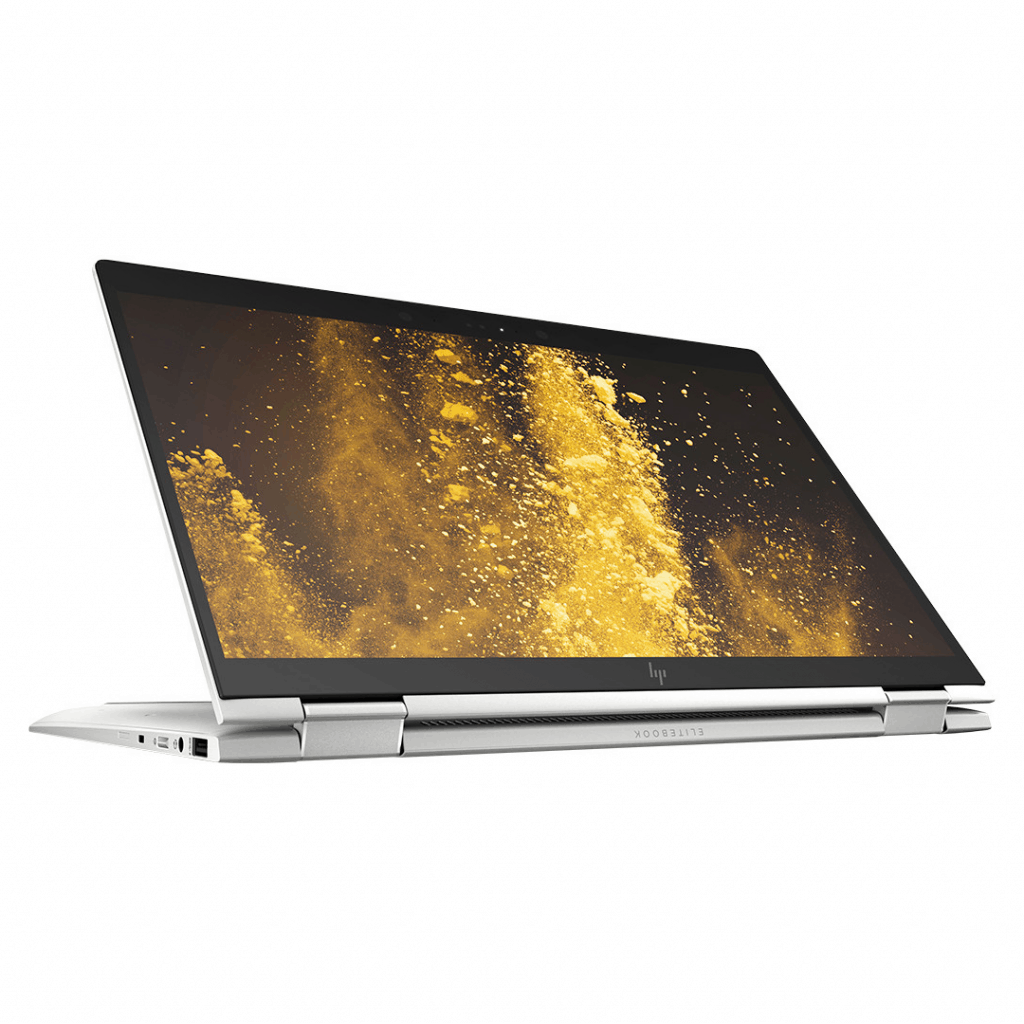
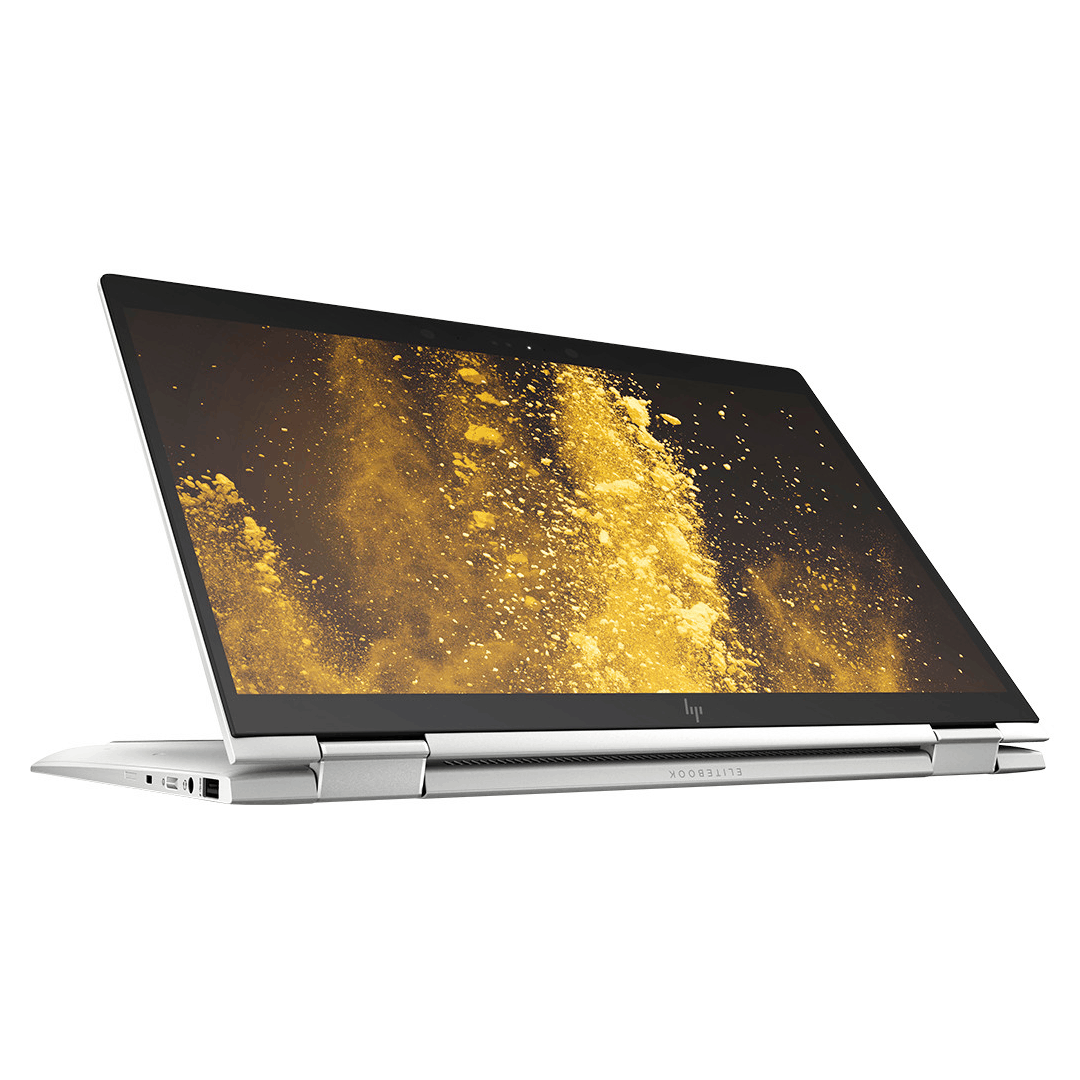
As one of the leading computer brands in the world, famous for its business computer product lines, in recent years, HP has continuously launched great product models with many new innovations, Keep up with the advancements of the times and meet the rigorous demands of the target customer group. Most recently, the introduction of the HP EliteBook x360 1040 G5 marked a new “era” for business computers.
The hinge certainly helps G5 can fold the screen at a smooth 360-degree angle. The laptop can transform into a tablet or operate under flexible tent mode.
Design and Build Quality
The EliteBook x360 1040 G5 has this premium vibe, with a build made from CNC-machined aluminum, it feels pretty solid but still comes off super polished. Then there’s the 360-degree hinge, so it kind of turns into different things, depending on what you’re up to. You can switch between laptop, tablet, tent, or stand modes ,and that makes day-to-day work feel easier, plus slide decks , and even content watching when you’re just relaxing.
It’s also fairly straightforward to carry around. The thin outline and the light feel mean it’s kind of built for movement, sorta agile. And the dimensions land around 12.65 x 8.46 x 0.66 inches (321.8 x 214.9 x 16.9 mm) even, while the weight sits at about 2.99 pounds (1.36 kg). You’ll spot diamond-cut accents and an anodized surface, those small touches make it look more professional. The hinge hardware feels sturdy too, it helps keep those mode transitions smooth, without the annoying wobble ,or losing that steadiness.
Display quality
On the front there’s a 14-inch Full HD screen, 1920 x 1080 pixels ands it’s touchscreen too. The bezels are pretty narrow, so the display space feels more present, with vivid colors and crisp texture for videos meetings and creative tasks. An anti-glare layer helps cut down reflections so you can still see clearly in different environments, whether you’re in a bright room or outside, and it won’t have your eyes fighting every second.
HP also gives optional choices, like a privacy screen, if you want extra confidentiality . This blocks visual snooping and limits viewing angles, so others can’t easily peek in. Tthe touchscreen supports Windows Ink, which is great for accurate stylus input, digital note-taking, small sketches, and general creative workflows. So overall, the display quality on the EliteBook x360 1040 G5 is a good mix of visual sharpness and touch-friendly convenience , aimed at professionals who need flexibility while working on-the-go.
Security capabilities
The EliteBook x360 1040 G5 is equipped with many security features such as face unlock, fingerprint scanning. At the same time, to limit the risk of outside attacks, HP has equipped with hardware protection such as HP Sure Start Gen4, automatically recovers the BIOS and creates a system copy so that users can recover through over network connections.
Flexibility
Besides, in terms of flexibility, the HP EliteBook x360 1040 G5 helps users connect to the maximum workflow to achieve 100% efficiency. With 360-degree rotating screen rotation, G5 allows users to use tablet mode or tent mode, extremely flexible when working in groups. Pre-programmed pen application and screen capable of applying pressure up to 4096 points, HP EliteBook x360 1040 G5 allows users to use, write, draw on the screen with a feeling of note taking and sketching It was like holding a pencil on a paper background. This is also a pioneering computer with integrated 4G LTE protocol to ensure continuous connectivity, anytime, anywhere for customers without interruption of work.
For some tasks, handwriting is always better than typing. The G5’s 4096-dot pressure touchscreen lets you write and draw on screens smoothly like on paper.
Keyboard and Trackpad
The EliteBook x360 1040 G5 comes with a full-size backlit keyboard, that is spill-resistant by tech choice, and it can also include the optional HP Sure View privacy screen. The island-style keys deliver a kind of tactile snap and a pretty comfortable typing vibe, so you can stay productive even during long typing stretches or those late-night work sessions.
Then there’s the Precision Touchpad, it supports multi-gesture input plus palm rejection, so your cursor control stays reliable and your navigation feels smooth across the desktop , or inside apps. The touchpad surface feels responsive, and the gestures are pretty natural to use, which also pairs nicely with the touchscreen function. That combo gives you flexibility for different input methods depending on your preferences, and also on how your workflow is set up.
Privacy
Not only possessing impressive security features, flexible connectivity and applications, the HP EliteBook x360 1040 G5 also values privacy. As can be seen, privacy seems to be gradually dominating technology products, and the G5 laptop is no exception.
HP Sure View integrated security screen helps users conceal content displayed on the screen for people sitting next to them. If you’re viewing sensitive information such as a company’s employee or financial records, simply press F2, HP EliteBook x360 1040 G5 will immediately reduce visual light when the screen is viewed from the side, probably Certainly the information you are working on on G5 will be protected “absolutely safe” from the “prying eyes”.
Modern design, luxury
The gray color scheme of HP EliteBook x360 1040 G5 will satisfy customers who love minimalism. With an impressive size and weight, only 1.35kg and 14-inch screen, slim edge design allows the size of the machine is only equivalent to the old 13-inch version. The rugged body is cut from CNC to create a strong and durable unibody frame. This machine has reached the durability standards of the US military MIL-STD.
Battery Life
Battery life kinda is one of the main things mobile professionals care about, and the EliteBook x360 1040 G5 actually manages to deliver solid endurance so you can keep going all day with work tasks plus that multimedia stuff. With different usage routines, and also depending on the power settings, the laptop often lands around 10 to 12 hours of battery life per charge. That means you can keep working remotely, jump into meetings, and handle travel without always hunting for an outlet.
HP’s Fast Charge is there to help with quick replenishing. It can get you to roughly 50% battery capacity in about 30 minutes. So there’s less downtime, and your productivity doesn’t really stall when you’re on-the-move. On top of that, the power management approach and the battery optimization options make the EliteBook x360 1040 G5 a pretty good fit for professionals who want dependable performance and a long lasting battery through the whole workday, not just for a couple of hours.
Connectivity Options
The EliteBook x360 1040 G5 has a solid set of ports and connectivity choices, so it can play well with different peripherals, extra displays and all that networking stuff you might need. Usually you’ll find USB Type-A and USB Type-C ports, plus Thunderbolt support, which helps with quick data moving, display handoffs and even charging the connected devices.
There is also an HDMI port for sending video out to external monitors or projectors. That makes dual-screen use easier for presentations, and for those more immersive, multimedia type moments. On top of that, the built-in Gigabit Ethernet is there, and depending on the configuration you can get optional LTE connectivity too. So you get dependable internet and network access in a range of places, which really boosts flexibility for remote work, business trips, and team collaboration projects.
Strong configuration, outstanding performance
Owning powerful configuration and outstanding performance, G5 is always a reliable companion of business people in every job.
After a sophisticated, minimalistic and luxurious casing that is very “suitable” of businessmen, the EliteBook G5 is equipped with 8th Generation Intel® Core ™ i7 processor, up to 32GB of memory, and 2TB of storage. Great battery life up to 17 hours. Equipped with 2 USB ports, 2 Thunderbolt ports and 1 HDMI port ensure you can connect to external monitors – a quite rare for laptops that prioritize thin and light design – and 3.5mm headphone jack allows you to block all annoying noises in the office.
With the above outstanding advantages, it is not difficult to understand when HP EliteBook x360 1040 G5 can satisfy every business customer.
Software and Security Features
The EliteBook x360 1040 G5 ships with Windows 10/11 Pro or Windows 11 Home , providing a kind of secure and productive day to day computing setup for business users, and also for enterprise deployments. HP brings in a set of enterprise level security bits like HP Sure Start Gen5 BIOS protection, HP Sure Run application security , and HP Sure Recover with Embedded Reimaging for protecting the data, and getting the system back when it needs to be, more or less.
There can be extra safeguards too, such as HP Sure Click for secure browsing, HP Sure Sense using AI to spot threats, and HP Privacy Camera with a physical shutter for stronger privacy. It also has a built in fingerprint reader, and optional IR camera support so Windows Hello can do facial recognition—this helps with quick and safe biometric login, keeping access control more clean for the authorized folks.
Audio and Multimedia
For sound , the EliteBook x360 1040 G5 comes with Bang & Olufsen-tuned speakers that aim for immersive audio , with clear reproduction and a more noticeable bass response when you watch , or join video calls, or run presentations. It includes dual array microphones too, so your voice capture stays sharp during online meetings, voice commands, and those back and forth collaborative discussions, with noise cancellation that helps reduce background noise and keep the speech more understandable.
Then HP Audio Boost steps in with advanced signal processing and audio tuning , which kind of optimizes the sound for different multimedia types and professional tools. Overall, the laptop’s audio features kinda line up with its flexible design, and the whole productivity angle, aimed at folks who really care about audio quality, better communication clarity and a little bit of multimedia fun at the same time . It’s like it’s built for people who notice the little stuff in sound, not just the headline specs.
Pros and Cons
Pros:
Nice premium aluminum look with a 360-degree convert hinge, like it actually flips every direction.
Bright Full HD touchscreen , plus optional privacy screen if you want that extra comfort.
Strong Intel Core inside, up to 16GB RAM and a quick SSD setup which helps with day to day speed.
Backlit keyboard, spill resistant build, and if you want the option, HP Sure View is there too.
Long battery life overall with fast-charge support so you’re not stuck waiting.
Plenty of connections too, like USB Type-C with Thunderbolt, which is pretty important.
Windows 10/11 Pro includes enterprise security features that feel solid.
Bang & Olufsen tuned speakers with HP Audio Boost, so audio is not just “there”, it’s actually good.
Cons:
It costs more than the typical consumer laptop, so yeah it’s not budget friendly.
Memory and storage upgrades are kind of limited depending on the configuration you pick first.
The display can be a bit reflective in bright rooms , so glare can show up sometimes.
For heavy gaming or demanding creative software , the graphics feel only moderately capable.
Conclusion
The HP EliteBook x360 1040 G5 feels like a premium convertible laptop for people who want flexibility, performance , and security while still staying portable. The sleek aluminum body, the 360-degree hinge, the colorful touchscreen, and those enterprise-grade protections make it a pretty smooth choice for business use, mobile professionals, and executives who care about productivity, connectivity, and mobility without really giving up too much.
Whether it’s for presentations, some creative work, or just everyday tasks, the EliteBook x360 1040 G5 mixes solid hardware, smart security features, and a comfortable design that can improve how you work, collaborate, and handle multimedia. With its adaptable modes, strong battery, and wide range of ports, it ends up being a good option for professionals in a fast moving environment who need flexibility reliability, and steady performance, all the time.
HP EliteBook x360 1040 G5 14″ Touchscreen LCD 2 in 1 Notebook – Intel Core i7 (8th Gen) i7-8650U Quad-core (4 Core) 1.90 GHz – 16 GB DDR4 SDRAM – 512 GB SSD – Windows 10 Pro 64-bit (English) – 19: Buy it now
HP EliteBook x360 1040 G5 14″ Touchscreen LCD 2 in 1 Notebook – Intel Core i7 (8th Gen) i7-8650U Quad-core (4 Core) 1.90 GHz – 16 GB DDR4 SDRAM – 256 GB SSD – Windows 10 Pro 64-bit – 1920 x 1080: Buy it now
HP EliteBook x360 1040 G5 (Intel 8th Gen i7-8550U Quad-Core, 16GB RAM, 512GB PCIe SSD, 14″ FHD: Buy it now
HP EliteBook x360 1040 G5 14″ Touchscreen LCD 2 in 1 Notebook – Intel Core i5 (8th Gen) i5-8350U Quad-core (4 Core) 1.70 GHz – 8 GB DDR4 SDRAM – 256 GB SSD – Windows 10 Pro 64-bit – 1920 x 1080 -: Buy it now
Related Posts

Tech Reviewer & Product Analyst
Định Bia has spent over 10 years testing consumer electronics with a focus on smart technology. He work as a product advisor at Biareview where he helped customers find the right devices for their needs. He personally tests every product featured on this site using a consistent evaluation framework covering quality, durability, and value. All reviews are based on experience, not influenced by the manufacturer.